
"I keep explaining the same procedure to my AI agent over and over." "When I hand it a big task, the context gets cluttered and quality drops." Anyone who uses AI agents seriously hits these walls sooner or later.
This guide walks through the three mechanisms for extending AI agents — Skills (adding knowledge and procedures), SubAgents (delegating specialist tasks), and Agent Teams (parallel execution) — from core concepts to practical decision rules. The content is based on the foundation lectures and agent-development modules we use in our corporate training and online courses.
If you are new to AI agents themselves, start with The Complete Guide to AI Agents for Business.
What you will learn
- What a Skill is — handing your AI a "work manual"
- The building blocks of SKILL.md and its scopes (project vs. user)
- What a SubAgent is — task delegation and context isolation
- How to define a custom SubAgent (model, tool restrictions, memory)
- Agent Teams — parallel and sequential multi-agent patterns
- A decision guide, plus the strongest combination: Skill-equipped SubAgents
- SKILL.md best practices and examples for non-engineers
What is a Skill? Handing your AI a work manual
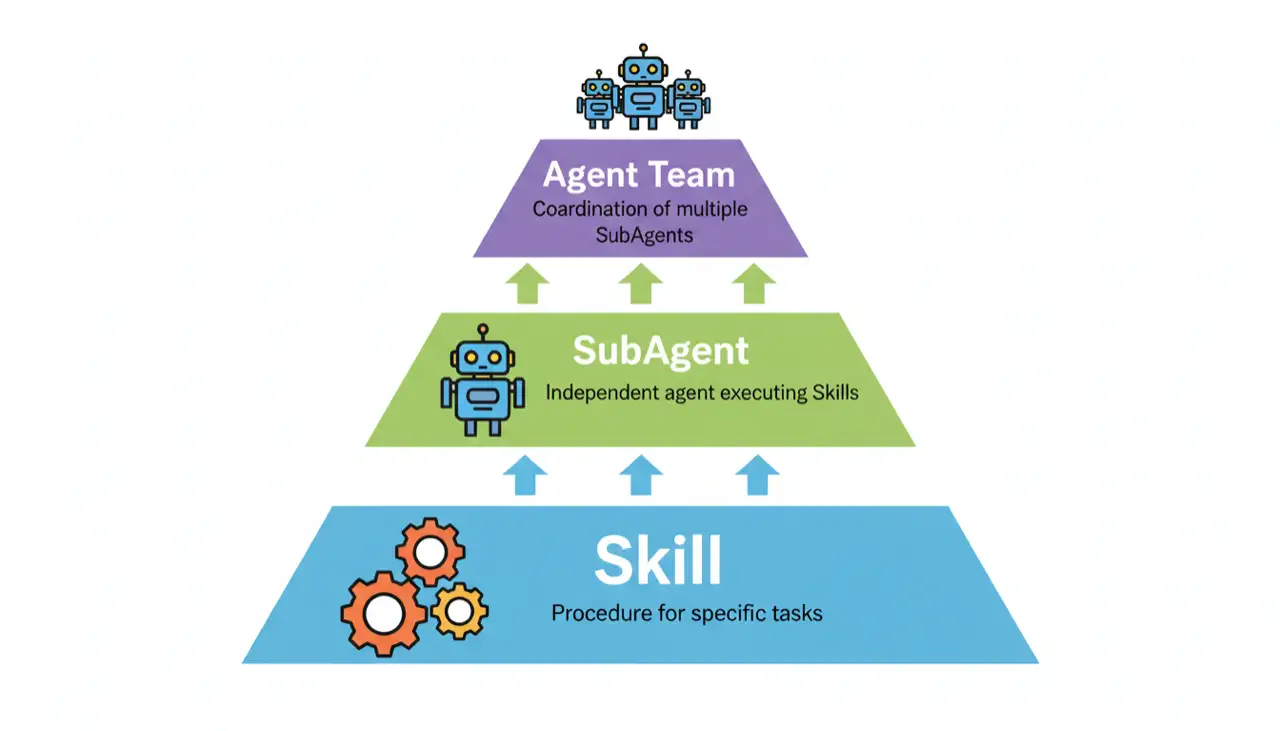
A Skill is a custom instruction document that defines domain knowledge and execution procedures for an AI agent. You place it as a SKILL.md file under .claude/skills/ (Claude Code) or .cursor/skills/ (Cursor).
Think of onboarding a new employee with a work manual. The manual explains when to use it, what steps to follow, and what to watch out for. The employee's raw ability (the model) does not change, but with organized knowledge and procedures to reference, the quality and consistency of their work improve dramatically.
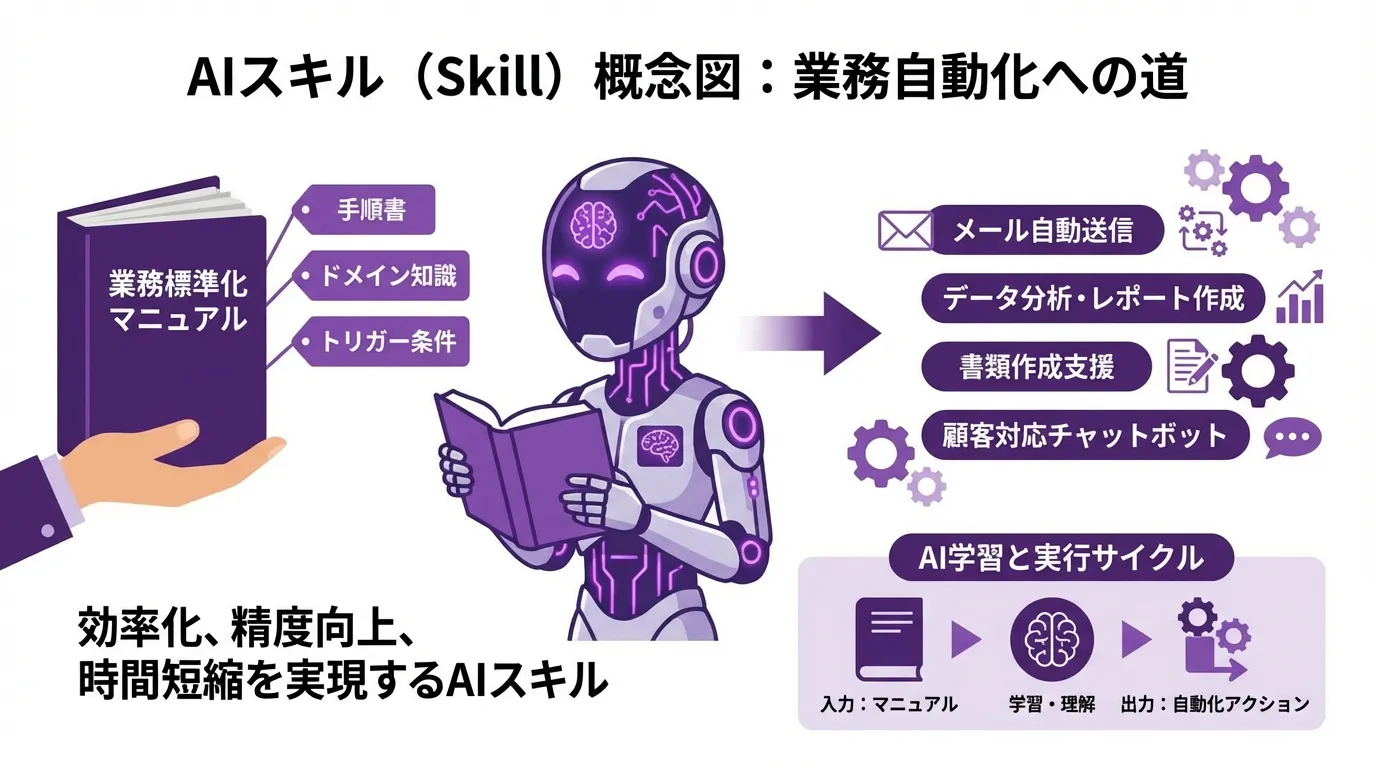
The biggest benefit: the AI no longer has to hunt for information on its own. Because the required knowledge and steps are organized in advance, the agent produces consistent results at the same quality every time.
The building blocks of SKILL.md
| Component | What it contains | Example |
|---|---|---|
| Name | The skill's identifier, usually matching the directory name | banner-creator, data-analyst |
| Trigger description | Which requests should activate this skill | "create a banner", "analyze this data" |
| Detailed procedure | Concrete steps, parameters, and caveats | API call patterns, output format specs |
The directory layout is simple — one folder per skill with a SKILL.md inside:
.claude/skills/
├── banner-creator/
│   └── SKILL.md     # banner generation steps and parameters
├── data-analyst/
│   └── SKILL.md     # data analysis workflow
└── seo-audit/
    └── SKILL.md     # SEO audit procedure
Skill scopes: project vs. user
| Aspect | Project level | User level |
|---|---|---|
| Location | .claude/skills/ in the repository | ~/.claude/skills/ in your home directory |
| Sharing | Shared with the whole team | Personal only |
| Management | Version-controlled with Git | Available in every project |
| Best for | Team-wide business procedures | Personal working style and tools |
Shared workflows like "how our team builds invoices" belong at the project level; personal preferences like "my writing style" belong at the user level.
What is a SubAgent? Delegating specialist tasks
A SubAgent is a child agent that executes a specialist task delegated by the main agent, using its own context window (the amount of information an AI can process at once) and its own custom system prompt.
Picture a project manager who delegates to a team of specialists instead of doing everything alone: research goes to a researcher, code review to a reviewer, design to a designer. Each specialist works in their own dedicated workspace and reports only the results back to the manager.
Why SubAgents matter
- Context isolation — detailed research logs stay inside the SubAgent; only a summary returns to the main conversation, so the main context stays clean
- Clean execution context — no irrelevant history means more stable accuracy
- Parallel execution — run multiple investigations simultaneously to save time
- Ideal for research — heavy file-reading work is kept out of the main thread
Built-in SubAgents (Claude Code example)
| SubAgent | Model | Purpose | Available tools |
|---|---|---|---|
| Explore | Haiku (fast) | Code search and analysis | Read-only |
| Plan | Inherited (same as parent) | Research for planning | Read-only |
| General-purpose | Inherited (same as parent) | Complex multi-step tasks | All |
There are two execution modes: foreground, where the main agent waits for the result (good for sequential chains), and background, where the main agent moves on without waiting (good for parallel Agent Team patterns).
Defining a custom SubAgent
Place a Markdown file under .claude/agents/ (or .cursor/agents/ in Cursor) with YAML frontmatter:
# .claude/agents/code-reviewer.md
---
name: code-reviewer
description: Specialist agent for code review
model: sonnet              # haiku / sonnet / opus
tools:
  - Read                   # restrict available tools
  - Grep
  - Glob
skills:
  - coding-standards       # Skills to reference
memory:
  scope: project           # user / project / local
---

## You are a code review specialist
Review code from these angles:
1. Readability and maintainability
2. Security issues
| Field | Role | Key points |
|---|---|---|
| model | Which model to use | haiku = fast and cheap (search), sonnet = balanced, opus = high accuracy (complex tasks) |
| tools | Restrict available tools | Listing tools explicitly enforces least privilege and directly improves safety; omitting it allows all tools |
| skills | Skills the SubAgent references | Inherits Skill knowledge — combining expertise with procedures. A Skill-equipped SubAgent is the strongest pattern |
| memory | Persistent learning memory | user (per user) / project (per project) / local (local only) |
Agent Teams: combining multiple SubAgents
An Agent Team is a pattern that combines multiple SubAgents in parallel or in sequence to handle large, complex tasks efficiently. Instead of one person grinding through a big project, several specialists work simultaneously and a leader integrates the results — reproduced with AI.
| Pattern | How it works | Effect |
|---|---|---|
| Parallel research | Multiple investigations run at once; the leader merges and summarizes | Major time savings |
| Chain (sequential) | Each step's output feeds the next | Stepwise quality improvement, workflow automation |
| Agent Team | The leader only directs; each member works in parallel on their specialty | Divide and conquer for large tasks |
Caveats to keep in mind:
- Agents cannot talk to each other directly — the leader relays everything
- More parallelism means higher API costs
- Tasks with dependencies cannot be parallelized
- For simple tasks this is over-engineering
In practice, 3–5 concurrent SubAgents is the sweet spot.
Decision guide: which one should you use?
| Requirement | Recommendation |
|---|---|
| Add procedures or knowledge | Skill |
| Delegate a specialist task | SubAgent |
| Run multiple tasks in parallel | Agent Team |
| Save context consumption | All of them help |
| Optimize cost | SubAgent (with a Haiku-class model) |
| Persistent learning (memory) | SubAgent |
As a one-line rule of thumb:
- Want to change what the AI knows → create a Skill
- Want to separate who does the work → launch a SubAgent
- Want the team to work simultaneously → run an Agent Team
- Want expertise + isolation + parallelism all at once → compose an Agent Team out of Skill-equipped SubAgents
SKILL.md best practices
Key points distilled from Anthropic's official authoring guidance, as taught in our course:
- Be concise above all — context is a shared asset. Write only the procedures and constraints the model does not already know
- Make name and description concrete — name uses lowercase letters, digits, and hyphens (max 64 characters); description is written in third person stating what the skill does and when to use it, including the keywords that should trigger it
- Keep the body around 500 lines or less — split longer content into separate files and treat SKILL.md as a table of contents; keep reference links one level deep
- Turn multi-step work into checklists — build in a verify-then-fix loop; for batch or destructive operations, stage them as plan file → validation → execution
- Pick one default procedure — avoid listing too many alternatives; always use forward slashes (/) in file paths
- Iterate from real usage — evaluate against representative tasks and refine from failure patterns; do not aim for perfection up front
Designing the degree of freedom also matters: fragile procedures get low freedom (fixed commands with validation), exploratory work gets high freedom.
Examples for non-engineers
SubAgents and Agent Teams are not just for coding. Examples from our course material:
- "Analyze three competitors' websites at the same time and build a comparison table" → three SubAgents investigate in parallel and merge into one report
- "Draft the social posts while designing the banner at the same time" → simultaneous multi-tasking
- "Prepare this month's sales report" → data analysis, chart creation, and writing split across roles
- Compose a marketing Agent Team where four specialist SubAgents produce copy drafts, visual direction, social posts, and a one-paragraph press summary in one run
Define repeated procedures as Skills, delegate big tasks to SubAgents, and parallelize independent research — these three habits alone transform agent productivity. To get your whole team up to speed hands-on, see our corporate AI agent training.
Frequently asked questions
Q. What is the difference between a Skill and a SubAgent? A. A Skill is an instruction document (SKILL.md) that adds knowledge and procedures, which the AI references autonomously based on the task. A SubAgent is a child agent with its own context window that executes specialist tasks delegated by the main agent. If you want to change what the AI knows, write a Skill; if you want to separate who does the work, use a SubAgent. They are complementary — a SubAgent that references Skills is the most powerful combination.
Q. What is the single biggest benefit of SubAgents? A. Context isolation. When you delegate heavy file-reading research to a SubAgent, the detailed logs stay inside the SubAgent and only a summary returns to your main conversation. The main context stays clean so accuracy does not degrade, and launching several SubAgents in parallel also shortens research time. Assigning a fast, low-cost model such as Haiku to search-type tasks optimizes cost as well.
Q. What should I write in a SKILL.md? A. Three essentials: a name, a trigger description, and the detailed procedure. The body should list when to use the skill, the steps, input/output formats, and prohibited actions. Keep it concise (around 500 lines or less), write only what the model does not already know, include concrete trigger keywords in the description, and run one real task to find missing instructions before refining.
Q. How many SubAgents can run in parallel in an Agent Team? A. Our course notes up to 10 simultaneous SubAgents are possible, but 3–5 is the practical range. More parallelism increases API costs, and tasks with dependencies cannot be parallelized at all. The standard pattern is launching about three independent research tasks (market, competitors, user needs) in parallel and having the leader integrate the results.
Q. Can non-engineers build Skills and SubAgents? A. Yes. Both SKILL.md and SubAgent definitions are plain Markdown files — no programming required. The fastest route is to pick one repetitive task ("I explain this same procedure every time"), then ask the agent itself to organize it into a SKILL.md draft. Test the draft on a real task, add whatever steps were missing, and it quickly matures into a production-grade skill.
Related articles
- The Complete Guide to AI Agents for Business
- Tokens and Context Windows Explained
- Prompt Injection and LLM Security
- AI Agent Governance for Business
- Corporate AI Agent Training (hands-on)
Related services
Ready to put AI agents to work?
Turn what you just read into real workflows. AI Agent Camp helps non-technical professionals go from using to building — hands-on.
Last reviewed: 2026-06-10