
"Why does our AI bill look like this?" "The AI forgets my original instructions once the conversation gets long." Both puzzles have the same explanation: tokens and the context window.
This guide explains the two concepts that determine an LLM's capacity and cost, then walks through practical techniques to keep costs down while maintaining output quality. The content is based on the foundation lectures we use in our corporate training and online courses.
For the bigger picture of how generative AI works (next-token prediction and more), start with The Complete Guide to AI Agents for Business.
What you will learn
- What a token is — the smallest unit an LLM processes
- Why tokenization is necessary — from text to numeric IDs
- Token estimation rules — and why some languages are "more expensive"
- Input vs. output tokens — pricing mechanics with a worked example
- What a context window is — comparing the limits of major models
- Why AI "forgets" instructions — context contents and compaction
- Six techniques to optimize token usage, plus a self-check list
What is a token? The smallest unit an LLM processes
A token is the smallest unit an LLM (large language model) uses to process text. The model splits text into chunks of words or characters before processing.
- English: "Hello, world!" → ["Hello", ",", " world", "!"] (about 4 tokens)
- Japanese: a five-character greeting may split into 3 tokens (varies by model)
Three key points:
- Languages differ in token efficiency — Japanese, for example, consumes more tokens than English for the same meaning
- One token ≈ about 4 characters in English (about 1–2 characters in Japanese)
- Code and symbols follow their own tokenization rules
Why tokenization is necessary
Computers cannot understand characters directly; text must be converted to numbers:
- Text: "Hello AI"
- Tokenization: ["Hello", " AI"]
- ID conversion: [15496, 9552]
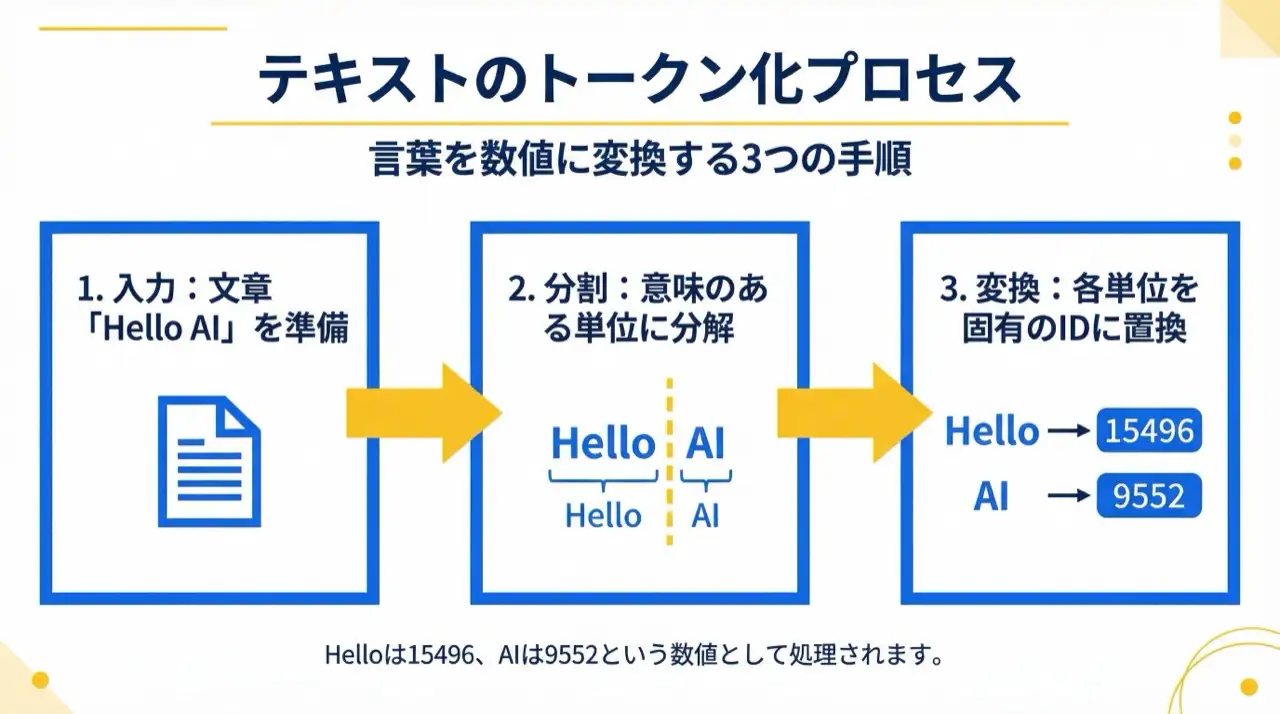
Each token gets a unique numeric ID, and these IDs are what the model takes as input. In other words, an LLM learns patterns of token IDs, not "the meaning of words."
Token estimation rules of thumb
| Amount of text | Approximate tokens |
|---|---|
| 1,000 English words | ~750 tokens |
| 1,000 Japanese characters | ~500–700 tokens |
| 100 lines of code | ~500–1,500 tokens |
Checking token counts before calling an API lets you forecast costs.
Input vs. output tokens: how pricing works
LLM usage is billed as input tokens plus output tokens — at different rates.
| Category | What it includes | Price level |
|---|---|---|
| Input tokens | Your prompt, the system prompt, conversation history, attached file contents | Relatively cheap |
| Output tokens | The AI's response text, generated code, the entire answer | More expensive than input (2–8x) |
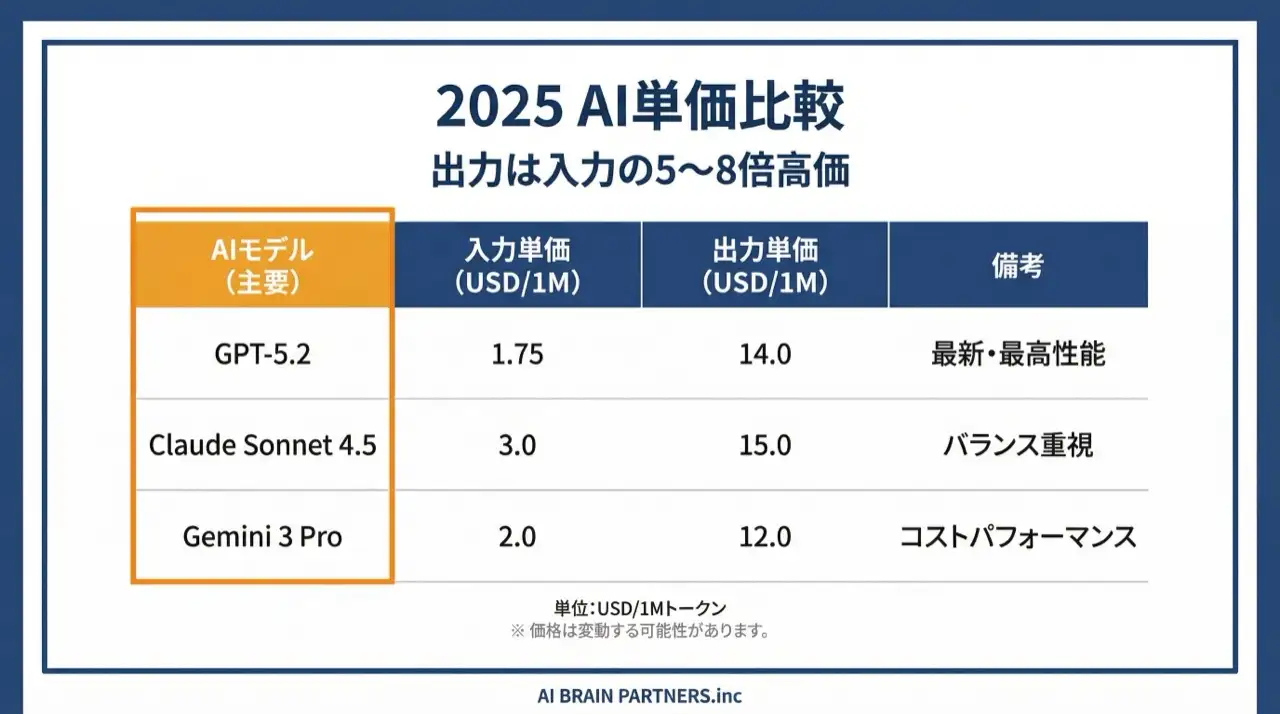
A worked example from our course (GPT-5.2, 2026):
- Input: 1,000 tokens × $1.75/1M = $0.00175
- Output: 500 tokens × $14/1M = $0.007
- Total: about $0.009 per request
Small per request — but hundreds of daily requests across a team add up fast. This is exactly why specifying the output format to limit output tokens is the single most effective saving technique.
What is a context window?
The context window is the maximum number of tokens an LLM can process at once. Major models compared (from our 2026 course material):
| Model | Context window | Rough equivalent |
|---|---|---|
| GPT-5.2 | 400K tokens | ~3 novels |
| Claude Sonnet 4.6 | 200K tokens (1M Beta) | ~1.5 novels |
| Gemini 3 Pro | 1M tokens | ~7 novels |
| Llama 4 Scout | 10M tokens | ~70 novels |
| DeepSeek-V3.2 | 128K tokens | ~1 novel |
Why it matters:
- It is the hard limit when processing long conversations or large files
- Beyond the window, older information gets "forgotten"
- A larger window = more information handled at once
Why AI "forgets" instructions: what's inside the context
"I gave careful instructions, but halfway through the AI started ignoring them." The culprit is the context window.
The crucial premise: the AI does not "remember" the conversation. On every turn, the context window is stuffed with all of the following:
- System prompt — the AI's base configuration and behavior
- User prompt — the current question or instruction
- Tools / MCP / Rules — available tools, external connections, project rules
- Documents (RAG) — reference material fetched by retrieval
- Past conversation history — the entire chat so far
Close the session and the AI forgets everything. For long-term memory, you must explicitly save information using a memory feature or by writing to files.
Compaction: what happens when the window fills up
As a conversation approaches the window limit, compaction kicks in: older messages are summarized and deleted. Space is freed, but information is lost. Most cases of "the AI forgot my original instructions" trace back to this.
For scale: reading a 1,000-line file once consumes roughly 4,000 tokens. Read 30 files and run 20 commands and you can exceed 100,000 tokens — large jobs simply cannot run without compaction.
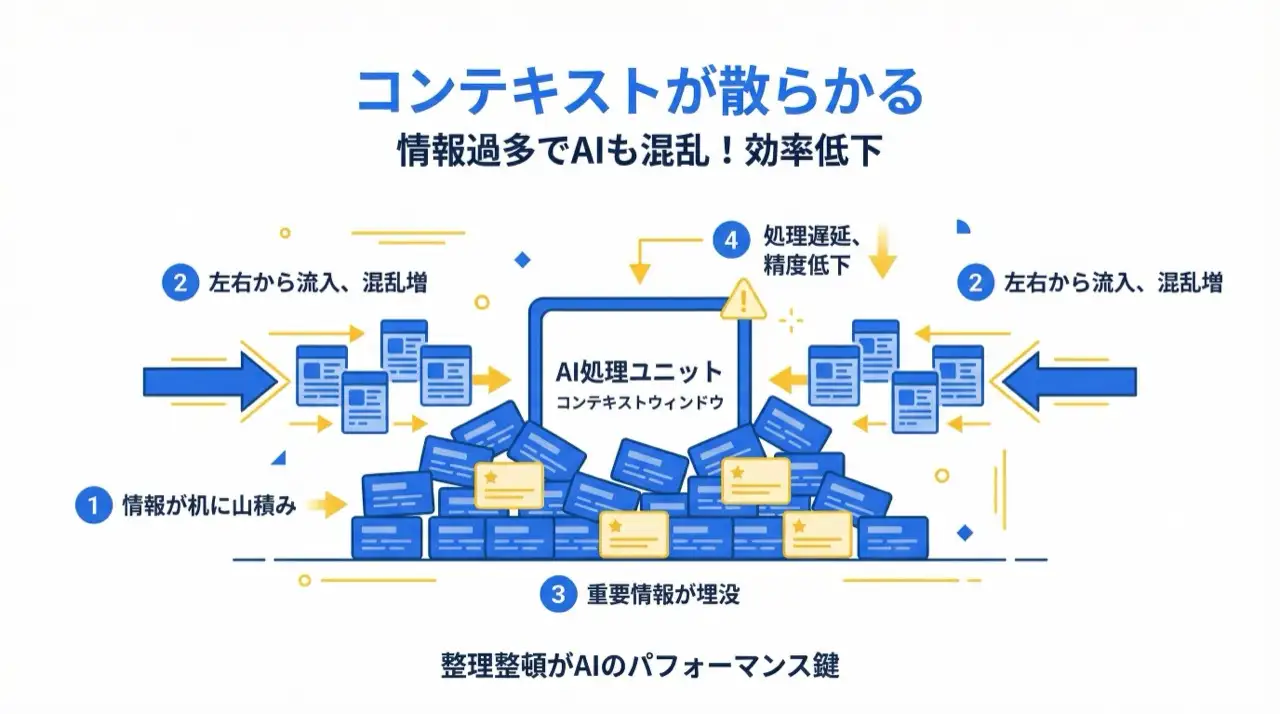
When all kinds of information pile into the context, the AI gets confused like a person at a cluttered desk. Keeping the context clean is the easiest way to maintain output quality. The remedy is simple: start a fresh session per task, and write important decisions out to files.
Six techniques to optimize token usage
| Technique | What to do | Example |
|---|---|---|
| 1. Concise prompts | Cut filler; focus instructions on essentials | "Please do X, and if possible…" → "Do X" |
| 2. Only what's needed | Extract just the relevant part of large files | Pass the specific function or section, not the whole file |
| 3. Specify output format | State the required format to prevent padding | "JSON, keys only", "bullet list, max 5 items" |
| 4. Manage conversation history | Summarize and reset long conversations | Past ~20 turns, summarize key points into a new chat |
| 5. Pick the right model | Match model to task complexity | Light models for simple tasks, top models for complex ones |
| 6. Consider language | English can be more token-efficient | Write technical instructions in English, request output in your language |
Self-check when costs feel high
The highest-impact items from our course checklist:
- One task = one chat — continuing unrelated tasks in a single conversation piles up irrelevant context
- Not attaching huge files whole — a 1,000+ line file alone burns 4,000+ tokens; pass only the needed range
- Plan before executing — unplanned trial-and-error consumes 2–3x the tokens through re-reading and redoing
- Rule files not bloated — rule files load into context every time; prune stale rules regularly
- Controlling output volume — "explain in detail" inflates output tokens; specify "concise, bulleted" instead
In short: token consumption = input (context) + output (answer). Keep the input small and control the output format, and the same amount of work costs dramatically less. For instruction-writing itself, see our related guides on agent extension and retrieval below.
Frequently asked questions
Q. What is a token, and how does it differ from a character count? A. A token is the smallest unit an LLM uses to process text, and it does not map one-to-one to characters. In English, one token is roughly 4 characters; 1,000 English words come to about 750 tokens, while 1,000 Japanese characters come to about 500–700 tokens. Languages differ in token efficiency — the same meaning can cost more tokens in one language than another — which matters directly for cost management.
Q. Why does AI output cost more than input? A. LLM pricing separates input and output token rates, and output is typically 2–8 times more expensive. For example, with GPT-5.2 (2026), a request with 1,000 input tokens and 500 output tokens costs about $0.009. That is why constraining the output format — "bullet points, max 5 items" — is the cheapest, most effective optimization: it directly cuts the expensive side of the bill while improving readability.
Q. Why does the AI forget my instructions mid-conversation? A. Because the AI does not remember anything — every turn, the entire context (system prompt, rules, reference documents, full conversation history) is packed into the context window. As the conversation approaches the limit, compaction summarizes and deletes older messages, losing information. Countermeasures: run one task per chat, summarize and restart long conversations, and write important decisions out to files instead of relying on the AI's "memory."
Q. Is a bigger context window always better? A. A bigger window handles more information at once (GPT-5.2 offers 400K tokens, Gemini 3 Pro 1M, Llama 4 Scout 10M), but it is not a license to stuff everything in. Irrelevant information confuses the model and degrades accuracy, and more input tokens mean higher costs. In day-to-day use, passing only the necessary information and keeping the context clean improves output quality more than raw window size.
Q. What is the simplest cost reduction I can apply today? A. Specify the output format. Constraints like "bullet list, max 5 items" or "JSON, keys only" directly reduce the expensive output tokens. Next: enforce one task per chat, and never paste huge files whole — pass only the relevant range. All three require no tool configuration changes, work immediately, and cause no quality loss.
Related articles
- The Complete Guide to AI Agents for Business
- What Is RAG? The 4-Step Pipeline, Vector Databases & Use Cases
- AI Hallucinations: Causes, Types, and Mitigations
- Skills, SubAgents & Agent Teams
- Corporate AI Agent Training (hands-on)
Related services
Ready to put AI agents to work?
Turn what you just read into real workflows. AI Agent Camp helps non-technical professionals go from using to building — hands-on.
Last reviewed: 2026-06-10