
"We want to start video marketing but nobody can shoot or edit" — or the opposite problem — "we tried AI video generation and the API bill exploded." Video delivers outsized impact, but the skill and cost barriers are real.
This guide covers the fundamentals of AI video generation and a strategy for producing business-quality video in-house while keeping costs under control. The central theme is how to combine generative video AI (Kling, Veo, and friends) with Remotion, a code-based video framework. The content is based on the training materials we use in our corporate workshops and online course.
What you will learn in this article
- What AI video generation is and what kinds of videos you can make
- The three cost models — metered APIs, flat-rate services, free local tools
- The A-roll / B-roll strategy that cuts costs by 75%
- What Remotion is, and how it differs from generative video AI
- Production recipes: product demos, storyboard animation, slide explainers, MV-style videos
- Required tools and how to handle API keys safely
What is AI video generation?
AI video generation is a technology where AI automatically produces video from text or images. You can create professional-quality video without filming or editing expertise.
Possible outputs include product demo videos, short-form social clips, AI-avatar presentation videos, and tutorials. Video is said to carry 5,000 times the information of text — and when AI removes the filming/editing barrier, the entry cost of video marketing essentially disappears.
The course combines generative video AI with Remotion to cover slide explainers, MV-style videos, storyboard animation, product introductions, and branding movies.
The most important premise — start from cost strategy
The first thing to internalize about business use of video AI is cost. Video generation APIs such as Veo3, Kling, Fabric, and HeyGen are metered, and costs escalate rapidly with mass generation.
Your options fall into three buckets:
| Model | Examples | Best for |
|---|---|---|
| Metered API | Kling, Veo, Fabric, etc. (via fal.ai) | Prototyping, small batches |
| Flat-rate services | GenSpark, Runway, Pika, etc. | Fixed monthly fee for mass production |
| Local / free | Remotion, FFmpeg, Ken Burns effect | Zero API cost, fully customizable |
Metered video engines cost roughly $2–15 per video. For high volume, consider flat-rate services — and push everything that can be done in code (captions, text cards, slideshows) into the free local bucket.
The A-roll / B-roll strategy — cutting costs by 75%
The heart of cost optimization is the A-roll / B-roll strategy. Instead of generating every cut with AI, you route each cut by its nature:
- A-roll (give to generative AI) — cuts where motion is the substance: character actions, key moments. Generate with Kling / Veo Image-to-Video (I2V). Reference figure: 4 scenes × $0.70 = $2.80
- B-roll (make for free) — scenery, text cards, still subjects. Produce with FFmpeg's Ken Burns effect (zoom and pan over a still image). 12 scenes × $0.00 = $0.00
In the course's worked example, converting all 16 frames to I2V costs $11.20, while the A-roll/B-roll strategy brings it down to $2.80 — a 75% reduction. Deciding which cuts genuinely need AI generation is what makes in-house video economical.
What is Remotion? — building video with code
Remotion is an open-source framework that lets you create videos with React components. You declare timelines, text animation, and layer compositing as code, assemble the video programmatically, and export to MP4 and other formats.
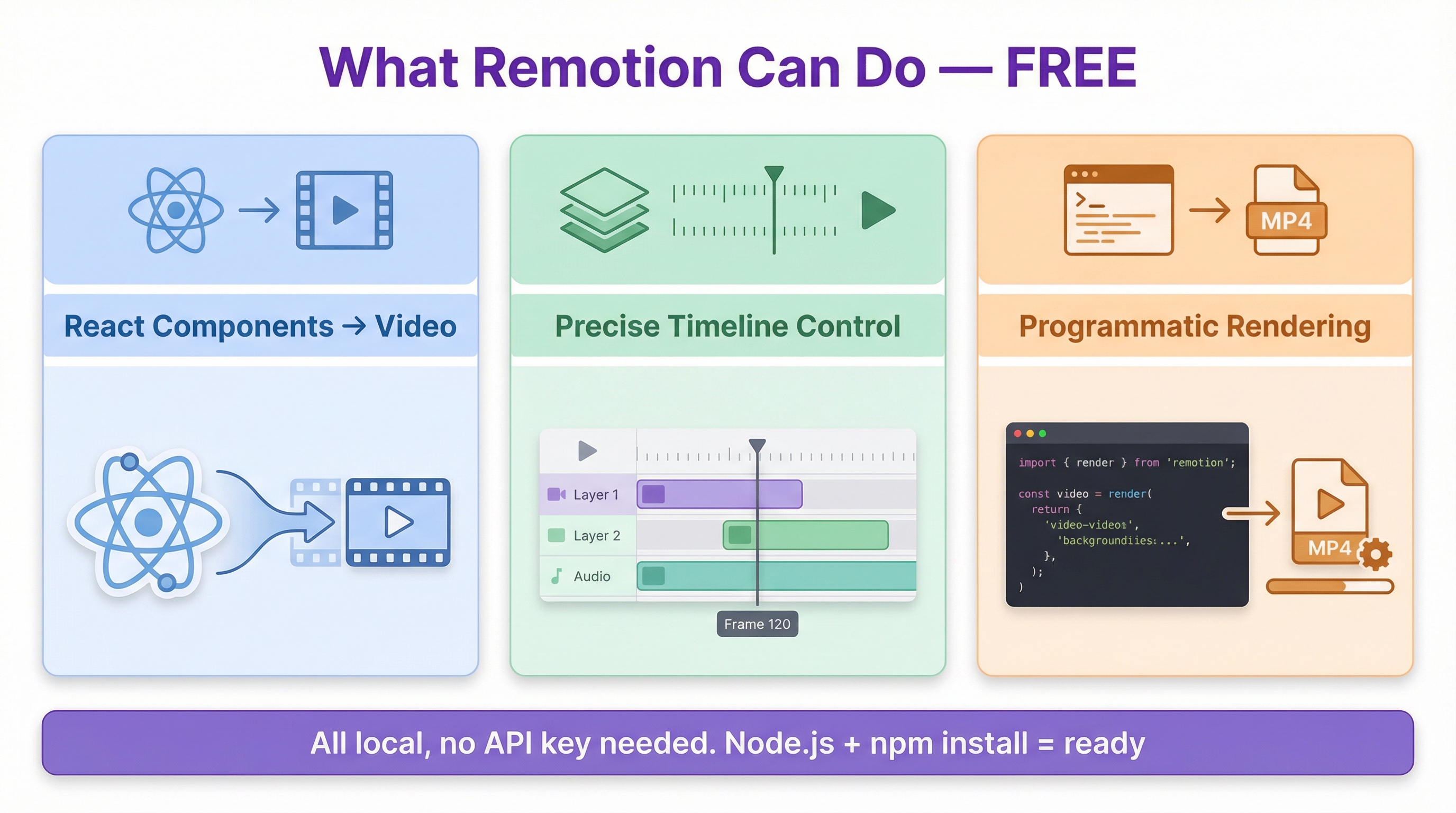
Here is how it contrasts with generative video AI:
| Aspect | Generative video AI | Remotion |
|---|---|---|
| Approach | Produces clips end-to-end from prompts | Declare layers, timing, and transitions in code |
| Strength | Generating footage you cannot film | Reproducibility, editing, compositing, export control |
| Cost | Metered ($2–15 per video) | Local rendering is free |
Remotion runs locally, so no API key is needed — just Node.js. It shines wherever you want reproducibility and brand control: templated narration videos, event openers, document explainers, MV-style pieces with a fixed cut structure, and composites with product screen recordings.
The most versatile production pattern is the hybrid: AI makes the assets, Remotion masters the timeline.
Production recipes and cost reference
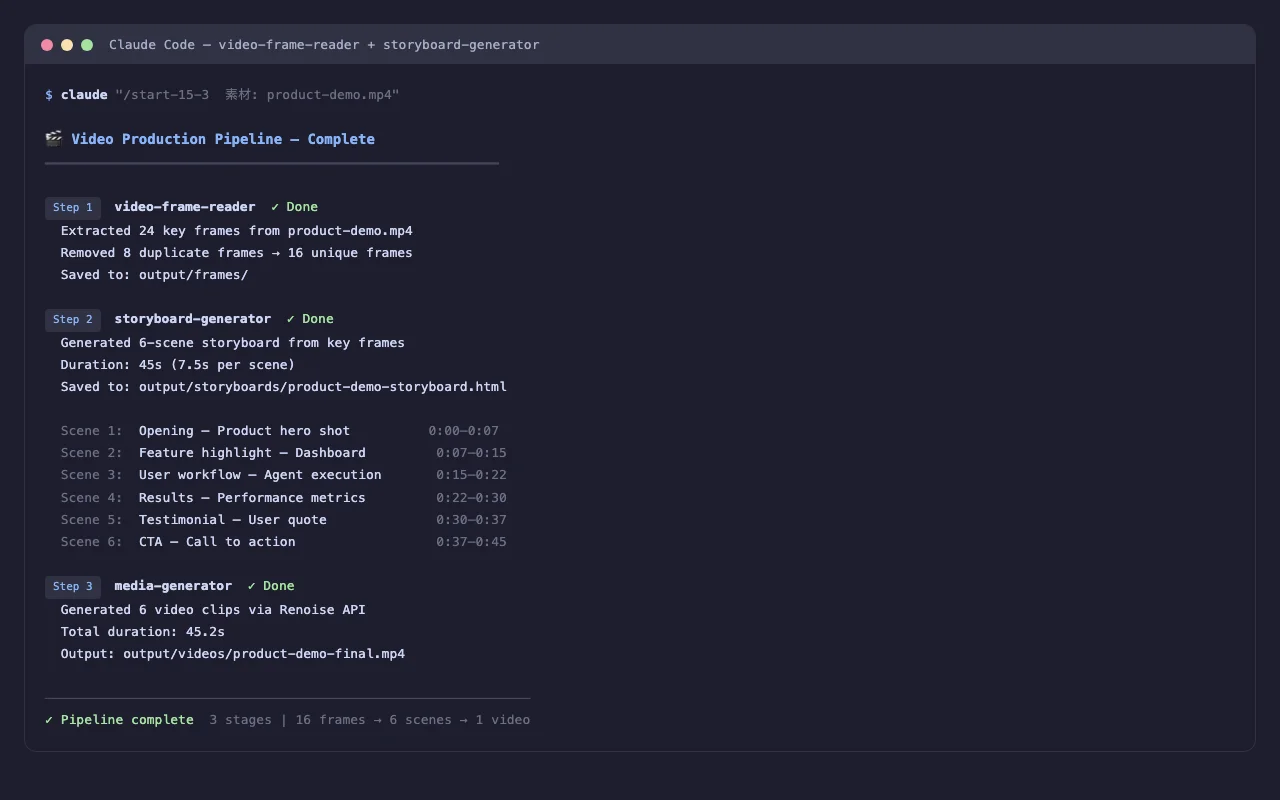
The main production patterns covered in the course, with cost figures:
| Pattern | Components | Cost reference |
|---|---|---|
| Product demo video | Auto-generated script + TTS narration (ElevenLabs) + video engine + green-screen compositing (FFmpeg) | ~$2.50 per video |
| Storyboard animation | Scene breakdown + storyboard frames → I2V for A-roll only + Ken Burns for B-roll → crossfade assembly + BGM | $2.80 (optimized) – $5.60 (full I2V) |
| Slide explainer | Slide images on a Remotion sequence + synced narration + transition animations | From cents if script-only |
| MV-style video | Music ingest → beat detection → scene generation → cuts snapped to beats | $3–5 (optimized) – $6–12 (full I2V) |
Other covered patterns include extracting high-interest segments from long YouTube videos for short-form clips, and converting a blog article into a vertical 15-second social promo. The latter pairs naturally with the AI article writing workflow.
Quality is decided by the shot list
Whether you use generative AI or Remotion, the biggest quality lever is not the technology — it is the shot list (cut structure). If you do not decide "what to show for how many seconds" up front, both the AI and Remotion will wander.
- Decide how many shots each section of the video needs (intro, development, close)
- Write one sentence per cut: who / what / how it moves
- Write out duration, framing, and caption presence for every cut before implementing
Researching the "language of motion" on design reference sites and template videos, then instructing the AI to "trace this transition," significantly improves fidelity.
Required tools and API key hygiene
The main tools in the production pipeline:
- fal.ai — a unified gateway that exposes multiple video/image/music models (Kling, Veo, Fabric, Suno, etc.) through one API and one key
- Gemini API — script generation, image generation, scene breakdown
- ElevenLabs — TTS narration synthesis
- FFmpeg — assembly, Ken Burns effect, green-screen compositing
- Remotion — code-based editing and export (Node.js 18+)
Handle API keys carefully: keep them only in environment files like .env.local or in a dedicated credential manager, and never paste them into chats, screenshots, or screen shares.
For the broader picture of agent-driven automation, see The Complete Guide to AI Agents for Business. For hands-on team training, see our corporate AI agent training.
Frequently asked questions
Q. How much does AI video generation cost? A. Metered video engines (Kling, Veo, Fabric, etc.) run roughly $2–15 per video. Costs escalate quickly at volume, so consider flat-rate services (such as GenSpark) for mass production and apply the A-roll/B-roll strategy. In the course's worked example, generating every cut with I2V costs $11.20, while strategic routing brings it to $2.80 — a 75% reduction.
Q. What exactly is the A-roll / B-roll strategy? A. It is a cost-optimization method that classifies cuts by nature and routes them to different production methods. Only cuts where motion is essential (A-roll: character actions) go to Kling/Veo Image-to-Video; scenery, text cards, and still subjects (B-roll) are produced free with FFmpeg's Ken Burns effect (zoom and pan over stills). You keep perceived quality while cutting API spend dramatically.
Q. Should I use Remotion or generative video AI? A. They play different roles, so the answer is to combine them. Generative AI produces clips end-to-end from prompts and excels at footage you cannot film, but it is metered. Remotion is code-first editing — layers, timing, and transitions declared in React — with free local rendering and strengths in reproducibility and brand control. The hybrid pattern, where AI makes assets and Remotion masters the timeline, is the most common in production.
Q. Can I start without any filming or editing experience? A. Yes. Script generation, TTS narration, footage generation, and compositing can all be assembled as an AI-and-tools pipeline, so camera gear and editor experience are not prerequisites. What does decide quality is the shot list — what to show for how many seconds — so write out each cut's duration, content, and captions in a table before producing.
Q. What should my first video be? A. Start with something that costs zero: a Remotion slide explainer or text animation. It runs locally with no API key, so failure is free. Once comfortable with the code-based flow, introduce fal.ai-based Image-to-Video for a small number of A-roll cuts, then progress to product demos (~$2.50 per video) or storyboard animation (from $2.80). That sequence balances cost and learning speed.
Related articles
- The AI Article Writing Workflow
- AI Banner & Image Generation for Business
- Generating Diagrams, Flowcharts, and Manuals with AI
- The Complete Guide to AI Agents for Business
- Corporate AI agent training (hands-on)
Related services
Ready to put AI agents to work?
Turn what you just read into real workflows. AI Agent Camp helps non-technical professionals go from using to building — hands-on.
Last reviewed: 2026-06-10