
"The official LINE admin console doesn't go far enough." "We want the whole team to handle inquiries, not one person." "We want to query friend data from the CLI." Once a LINE Official Account (LINE OA) becomes a serious channel, every operator hits these walls.
This guide explains how to build a fully self-controlled LINE OA operation stack with Cloudflare Workers and the LINE Messaging API — covering the differences between auto-reply, scenario delivery, and broadcast, a two-way Slack bridge, and KPI checks from the CLI or an AI agent like Claude Code, plus the gotchas that trip up most teams. The content is based on the training materials (Module 23) we use in our corporate training and online course.
LINE is a messaging platform widely used in Japan and other Asian markets; if your business serves customers there, the OA channel is hard to ignore.
What you will learn
- Why build a self-managed LINE OA stack
- Setup overview (5 steps)
- The biggest trap — onboarding existing friends (the auto-register pattern)
- Auto-reply vs scenario vs broadcast
- Rich menus and Flex messages: implementation notes
- A two-way Slack bridge for team-based inquiry handling
- Checking KPIs from the CLI and AI agents
Why a self-managed LINE OA stack?
A self-managed LINE OA stack means controlling delivery, replies, and friend management with your own code and database — Cloudflare Workers plus the LINE Messaging API — rather than relying on the official admin console.
The console handles basic delivery fine. Three reasons to build your own anyway:
- Functional freedom — combine keyword auto-replies and scenario delivery however you like, with a data model you design
- Team operations — mirror LINE inquiries into Slack so anyone on the team can reply
- Data portability — friends and message logs live in D1 (a database), open to SQL and AI-agent analysis
This is the next step for operators and engineers who have started to feel the console isn't enough.
Setup overview (5 steps)
The build proceeds in five steps. Here we keep to the overview — the course materials walk through each screen in detail.
- Create a Messaging API channel — open your Provider in the LINE Developers Console and create a new Messaging API channel. Note this is different from a "LINE Login channel"; delivery uses the Messaging API one
- Record the Channel Secret and Access Token — copy both and pass them to the Worker with
wrangler secret put. Reissuing the Access Token immediately invalidates the old one — be careful on shared teams - Set the Webhook URL and Verify — paste your Worker URL and run Verify. Webhook responses are expected within roughly one second, so heavy work should be pushed to the background
- Deploy the Cloudflare Worker — configure D1 (database) bindings and deploy. Secrets are registered individually with
wrangler secret put, never written in code - Confirm with
wrangler tail— watch real-time logs, send a LINE message, and confirm the webhook receives the event
The biggest trap — auto-register for existing friends
The most common failure in LINE OA operations is messages silently disappearing right after a migration (silent drop).
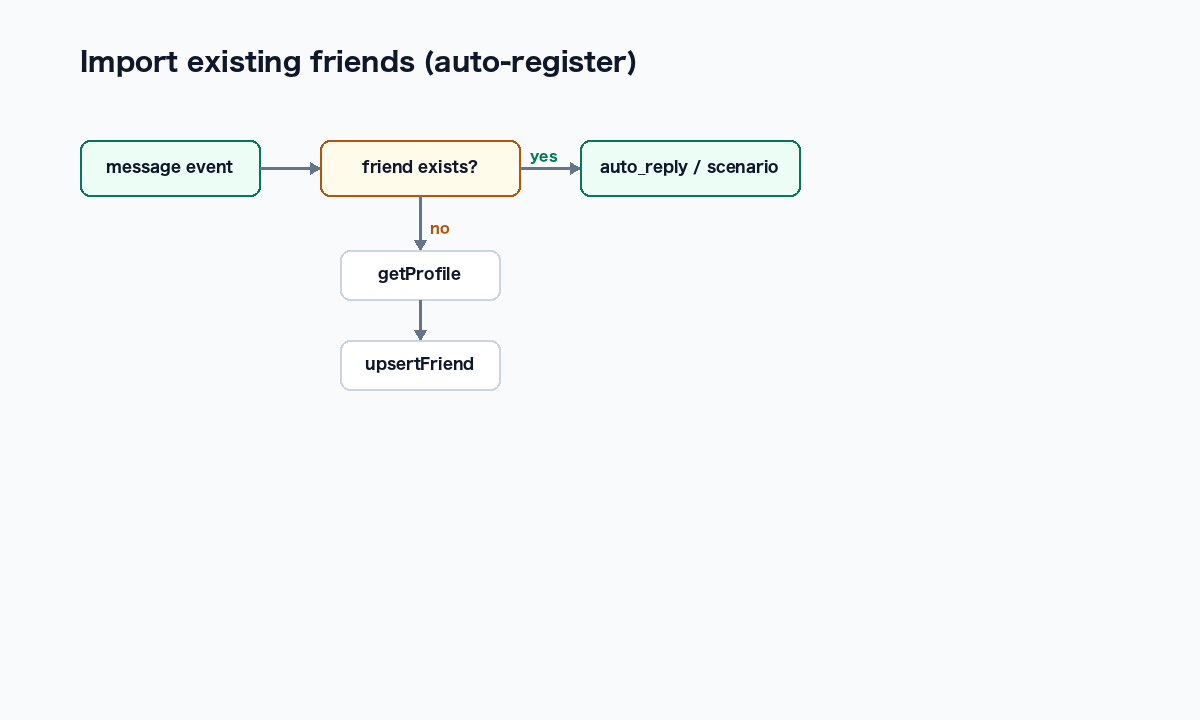
Immediately after migrating from another environment, you get a state where "friends exist on LINE but not in your database." If your webhook handler is written to bail out when the friend record is missing, messages from existing friends are discarded with nobody noticing.
The root cause is structural:
- The LINE Messaging API does not provide bulk retrieval of existing followers
- In a new environment, nothing creates a friend record until a follow event or message event arrives
The fix is the auto-register pattern:
- On receiving a message event, if the friend is missing from the DB, fetch their profile on the spot and upsert the record
- Run auto-replies and scenarios after the friend record is created
Friends are then absorbed into the DB "in order of whoever messages first." Two anti-patterns to avoid: returning early when the friend is missing, and creating friends only inside the follow event handler.
Auto-reply vs scenario vs broadcast
Three delivery mechanisms look similar but differ in trigger, cost, and use case:
| Type | Trigger | Cost | Use case |
|---|---|---|---|
| Auto-reply (auto_reply) | Message received + keyword match | Free (reply API doesn't count against message quota) | FAQs, coupon resends, rich menu actions |
| Scenario | Trigger such as friend-add + time delay | Counts as push API (consumes monthly quota) | Onboarding (immediate / 24h / 3d / 7d / 14d) |
| Broadcast | Manual or scheduled time | Push API (recipients x messages) | Sale announcements, new content |
Implementation gotchas from the course materials:
- Auto-reply is free, but fails once the reply token expires (30 seconds)
- Scenario delays are in minutes; specify 0 for immediate sending
- A broadcast left in draft status never sends — an explicit send is required
Rich menus and Flex messages: implementation notes
A rich menu is the persistent navigation area at the bottom of the chat screen. Implementation is four steps — generate the image, register metadata plus tap areas, upload the image, apply as default to all friends — all driveable via API. A neat design trick: set tap actions to send a keyword message that flows into your auto-replies, so the whole loop completes without external URLs. Note that setting a new default menu automatically detaches the old one, but old menus still need explicit deletion.
Flex messages (carousels) display multiple rich cards in one horizontally scrollable message. The biggest trap: bubbles inside a carousel cannot use the largest size (giga) — using it anyway is the most common cause of broken rendering. Also: match the hero image's aspect ratio to the actual image, keep button labels within 20 characters, and use https URLs only.
A two-way Slack bridge — team-based inquiry handling
What turns LINE OA from a one-person job into a team workflow is a two-way Slack bridge:
- Incoming LINE messages are mirrored as threads into a dedicated Slack channel (e.g. #line-inbox)
- Replies posted in the Slack thread are forwarded back to the LINE user
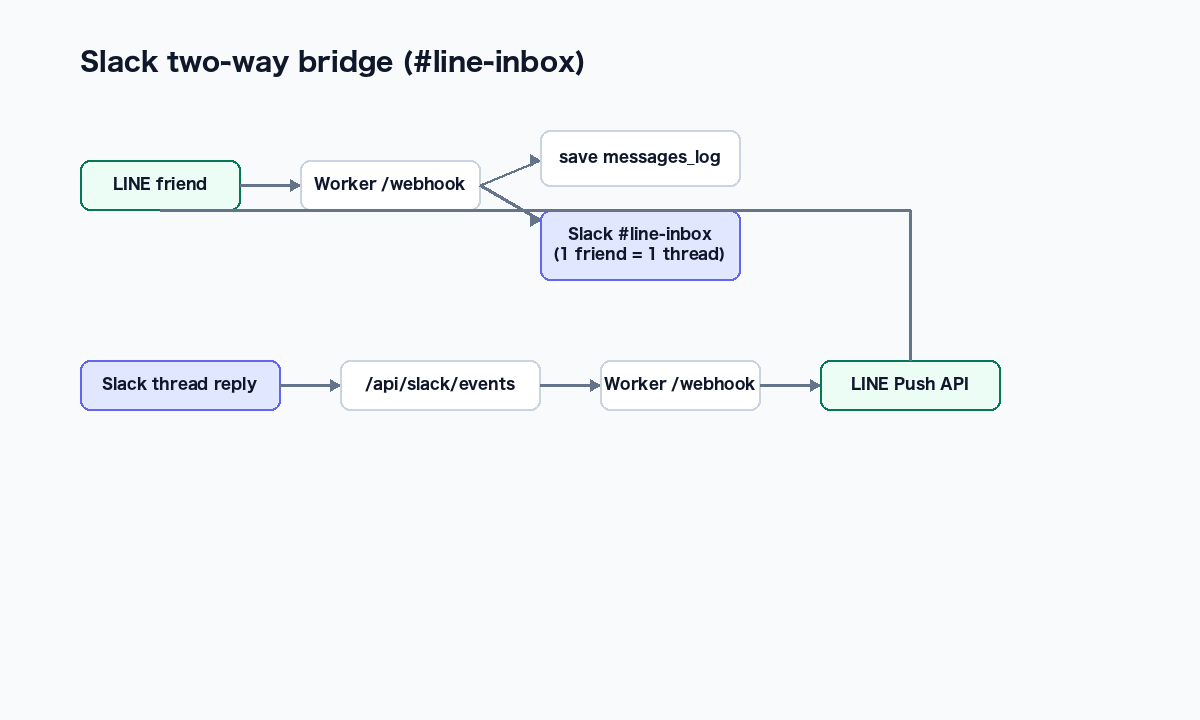
The most common blocker: reusing an existing Slack App with Socket Mode ON, which rejects HTTP-based event delivery. Create a dedicated app or turn Socket Mode off.
The other critical design point is loop prevention — your own bot's posts come back through the event stream, so filter on four conditions:
- Ignore posts with a bot_id (your own messages echoing back)
- Ignore messages with a subtype (joins, edits, and similar)
- Ignore the thread's parent message itself
- Ignore top-level posts; forward thread replies only
Checking KPIs from the CLI and AI agents
The real payoff of a self-managed stack: operational data is accessible from the CLI and AI agents. No browser console needed to see friend growth, unanswered messages, or campaign response.
| Method | What it gives you |
|---|---|
| Account summary (MCP tool) | Friend count, active scenarios, recent broadcasts in one call |
wrangler d1 execute | Direct SQL against D1: friend trends, keyword aggregation, campaign impact |
| Conversation list/detail (MCP tools) | Unanswered conversations ordered by hours elapsed, plus full per-friend history |
| Friend list (MCP tool) | Filter by tags and metadata; analyze by acquisition source (X / note / LP) |
wrangler tail | Real-time webhook event stream for debugging and auto-reply verification |
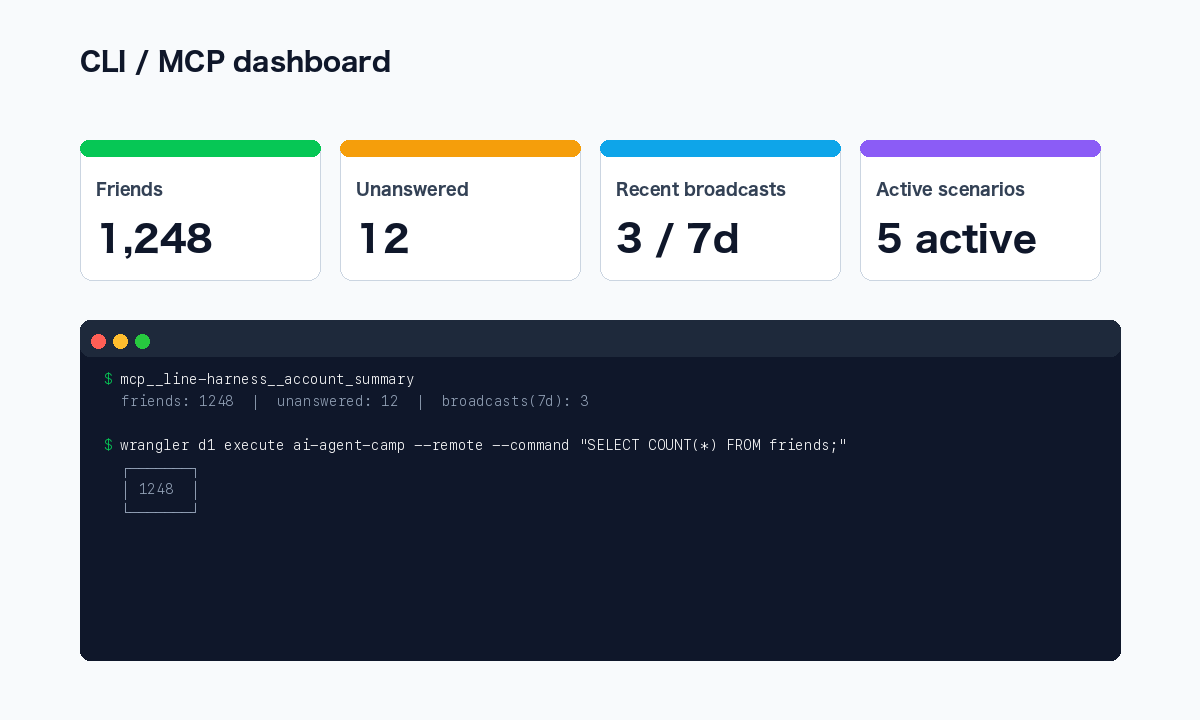
Called from an AI agent like Claude Code, a natural-language request — "summarize this week's new friends and unanswered inquiries" — comes back as an operations report. Two gotchas: wrangler d1 execute reads the local DB unless you pass --remote, and date aggregation needs care because JST and UTC coexist in the data.
Frequently asked questions
Q. Isn't the official LINE admin console enough? A. For basic delivery and canned replies, yes. A self-managed stack matters when you reach the stage of combining keyword replies and scenarios freely, handling inquiries as a team via Slack, or analyzing friend data with SQL and AI. Until the console stops being enough, there is no need to migrate.
Q. What technical skills does the build require? A. The main components are Cloudflare Workers (serverless runtime), the LINE Messaging API, and a database such as D1. Most of the code can be written by an AI agent, so what you really need is an understanding of the overall architecture and the critical points — webhooks and secret management. Secrets are registered with wrangler secret put, never hardcoded.
Q. What's the difference between auto-reply and scenario delivery? A. Auto-reply responds immediately on message receipt with keyword matching, uses the reply API, and doesn't consume your message quota. Scenarios deliver multiple steps over time from a trigger such as friend-add, count as push API, and consume monthly quota. Use auto-reply for FAQs and scenarios for onboarding.
Q. Why do existing friends stop getting responses after a migration? A. Because the LINE Messaging API has no bulk follower retrieval, a new environment starts with an empty database. If the webhook handler bails out when a friend record is missing, messages from existing friends are silently discarded. The fix is the auto-register pattern: on message receipt, fetch the profile and register the friend on the spot.
Q. How do we measure results? A. Friends and message logs persist in the D1 database, so SQL gives you friend growth, keyword aggregation, and campaign impact directly. Filtering on the message log's source column (user/broadcast/scenario/auto_reply/manual) sharpens the analysis, and via an AI agent the whole reporting step can run from a natural-language request.
Related articles
- The Complete Guide to AI Agents for Business
- AI Secretary: Automate Gmail, Google Calendar & Drive
- Automate Your Work with Google Apps Script and AI
- Notion x AI: Automating Databases and Page Generation
- Corporate AI agent training (hands-on)
Related services
Ready to put AI agents to work?
Turn what you just read into real workflows. AI Agent Camp helps non-technical professionals go from using to building — hands-on.
Last reviewed: 2026-06-10