
"AI agents are great, but I still have to open my laptop and prompt them every time." The next step is making the agent run automatically, triggered by time or events.
This article explains the foundation for that: GitHub Actions, written for non-engineers. We cover CI/CD basics, how workflows are written, safe API key management with Secrets, scheduled execution, and how to embed AI CLI tools into workflows. The content is based on the GitHub Actions module of our corporate training and online course.
What you will learn
- The difference between Git and GitHub, and what GitHub Actions is
- CI/CD (continuous integration / continuous delivery) basics
- Workflow YAML structure — triggers, jobs, and steps
- Secrets — handling API keys safely
- Automation recipes: scheduled and event-driven
- Running AI CLI tools (Claude Code / Codex) inside Actions
- The free tier and practical caveats
First, the basics: Git vs. GitHub
GitHub Actions runs "on GitHub," so let's get the terms straight first.
- Git (a local tool) — a version control tool that runs on your computer. It records changes (commits) and branches history. It works without an internet connection
- GitHub (a cloud service) — stores Git-managed code online and adds sharing, review (pull requests), and issue tracking
GitHub Actions is a mechanism that automatically runs tests, builds, deployments, and other tasks when you put code on GitHub. You simply place a configuration file (YAML) in the repository, and workflows fire on triggers such as pushes, pull requests, or a schedule.
That enables automatic code-quality checks, recurring data collection, scheduled AI agent runs, and automated website deployment. The biggest reason to learn GitHub Actions is that it turns "tasks I did manually every time" into automation triggered by code changes or the clock — the foundation for making your agent work 24 hours a day.
CI/CD in one table
The classic use of GitHub Actions is CI/CD.
| Term | Meaning | What it does for you |
|---|---|---|
| CI (continuous integration) | Automatically test and verify code changes | Runs builds and tests on every push |
| CD (continuous delivery) | Automatically deploy tested code | Releases verified code without manual steps |
CI/CD reduces manual mistakes and dramatically speeds up development cycles. But the focus of this article is what comes next: repurposing the same machinery for scheduled and automated AI agent runs.
Workflow structure: triggers, jobs, steps
Workflows live as YAML files in the .github/workflows/ folder. There are three building blocks to understand.
- Triggers (on) — when to run: push, pull_request, schedule (recurring), workflow_dispatch (manual), and more
- Jobs — the units of work; multiple jobs can be chained together
- Steps — the individual actions inside a job; environment variables are available here
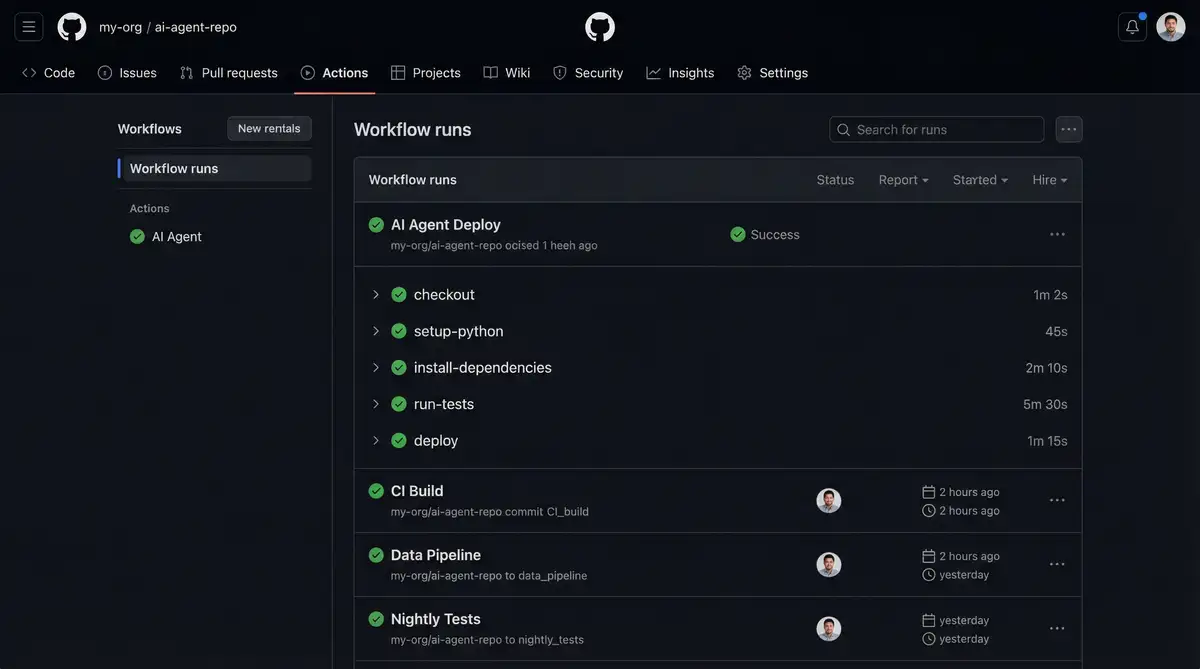
A typical CI workflow is "on push, run lint → tests → build in order." Ask an AI agent and it will generate the YAML for you, including Node.js setup, caching, and failure notifications. That's also the fastest way to learn: don't memorize YAML — have AI generate it and learn to read the structure (triggers, jobs, steps).
Three practical tips from the course:
- Start with a simple workflow and add complexity gradually
- Add a workflow_dispatch trigger so you can test manually
- If the workflow uses repository code, put actions/checkout@v4 as the very first step
Secrets: handling API keys safely
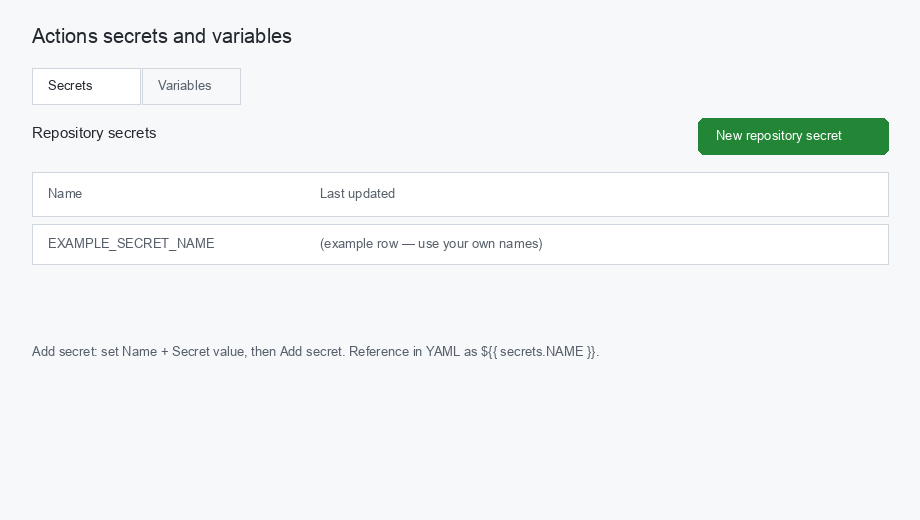
Running AI agents in Actions requires AI API keys and external service tokens. Never write these directly in YAML or code. Register them in GitHub's Secrets feature and reference them from workflows as secrets.KEY_NAME.
Setup steps:
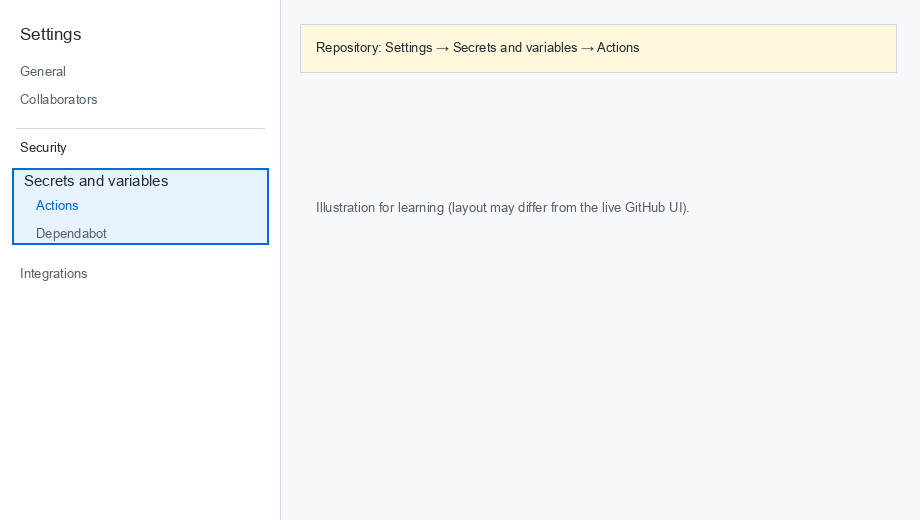
- Open the repository's top page
- Open the "Settings" tab
- In the left sidebar, choose "Secrets and variables" → "Actions"
- Under "Repository secrets," click "New repository secret" and register the Name and Secret
Three behaviors worth knowing:
- Secret values are automatically masked so they don't appear in logs
- Forked repositories cannot access your Secrets
- Besides Repository Secrets, Environment Secrets let you separate values per environment (production/staging)
Automation recipes: from cron jobs to agent pipelines
Representative setups from the course, in order of difficulty:
| Recipe | Trigger | What gets automated |
|---|---|---|
| Recurring data collection | schedule (cron) | Fetch data every morning at 9 → commit to the repo → notify Slack |
| News delivery | schedule | Pull news from RSS feeds → deliver via email and Slack webhook |
| Issue-driven agent | Issue created | Parse the issue → classify the task → run the AI agent → post results as an issue comment |
| Knowledge base sync | schedule + manual | Sync Slack and Google data in parallel and reflect it in the repo |
The key is to use time triggers (cron) and event triggers (issues, pushes) for different jobs: recurring reports and data collection suit time triggers; request-based processing suits issue triggers.
Multi-job designs like the knowledge base sync have operational benefits. The course example combines three jobs — Slack sync, Google sync, and parent repository update — in one workflow, keeps credentials in Secrets, and supports both scheduled and manual (workflow_dispatch) runs. Everything is operated from one place, and commit history shows exactly when data was ingested. For what to do with the Slack data itself, see Slack + AI: Semantic Search and Task Extraction.
Running AI CLI tools inside GitHub Actions
Embed AI CLI tools (Claude Code CLI or Codex CLI) into this machinery and you can run the AI agent itself inside a workflow.
- Trigger AI code review automatically on pull requests
- Have scheduled runs auto-generate PRs (proposed changes)
- Put API keys in Secrets and reference them from the workflow
The essence of this combination: moving from "AI that works only while a human sits at the keyboard" to "AI that works unattended, triggered by repository changes or the clock."
As a finishing touch, extend to automatic deployment of build artifacts to GitHub Pages or Vercel, artifact retention, and auto-generated release notes on tag pushes — automating the whole "build → verify → publish" pipeline.
Free tier and caveats
- The free plan includes 2,000 minutes of Actions runtime per month — more than enough for personal automation
- Scheduled runs can be delayed during congestion — not suitable for minute-precision tasks
- Secrets are masked in logs, but also enforce a rule of never echoing them yourself
Frequently asked questions
Q. Can I use GitHub Actions without programming experience? A. Yes. Workflows are YAML configuration files, and an AI agent can generate them from a request like "create a workflow that fetches data every morning at 9, commits it, and notifies Slack." What you need is not the ability to write YAML, but the ability to read the trigger–job–step structure and confirm it matches your intent.
Q. Is GitHub Actions free? A. The free plan includes 2,000 minutes of runtime per month, which comfortably covers individual and small-team automation such as a few minutes of scheduled AI agent runs each morning. Consider paid plans if you exceed the quota or operate at organizational scale.
Q. Where should I put my API keys? A. Register them under Settings → Secrets and variables → Actions as Repository Secrets, and reference them in workflows as secrets.KEY_NAME. Never hard-code them into code or YAML. Secrets are automatically masked in logs, and forked repositories cannot access them.
Q. My scheduled workflow doesn't start exactly on time. Why? A. GitHub Actions scheduled (cron) runs can be delayed when the platform is busy — that's expected behavior. It's fine for "run around 9 a.m." report generation, but not for minute-precision tasks. Adding workflow_dispatch (manual trigger) alongside the schedule makes it easy to re-run after delays or failures.
Q. What's the best first scheduled AI agent task? A. Start with read-only tasks that are safe to redo: morning news collection, Slack unanswered-message checks, or data aggregation reports. Once those run reliably, expand step by step into write-side processing such as issue-driven task handling or deployment automation.
Related articles
- Slack + AI: Semantic Search, Task Extraction & Unanswered Checks
- AI Marketing Automation: Social Posts, SEO Audits & Email
- What Is Generative AI? A Business Guide to LLMs and AI Agents
- The Complete Guide to AI Agents for Business
- Corporate AI Agent Training (Hands-on)
Related services
Ready to put AI agents to work?
Turn what you just read into real workflows. AI Agent Camp helps non-technical professionals go from using to building — hands-on.
Last reviewed: 2026-06-10