
"What exactly is generative AI?" "I've tried ChatGPT, but I can't see how it applies to our actual work." Business practitioners — especially non-engineers — tend to stall right here.
This article organizes generative AI from the perspective of business automation and AI agent adoption in companies. Unlike generic "what is generative AI" explainers, we cover the mechanics (LLMs, tokens, hallucinations) to exactly the depth needed for business decisions, then connect everything through to "how do I apply this to my own work." The content is based on the foundation lectures we actually use in our corporate training and online course.
For a deeper, systematic treatment of how agents work end to end, see also The Complete Guide to AI Agents for Business.
What you will learn
- What generative AI is, in one sentence
- The evolution of AI and where we are now — why "generative AI" matters today
- How generative AI works — LLMs predict "the next word"
- Tokens and cost — the unit you must understand for business use
- How it differs from traditional AI and chatbots, and what it can do at work
- Hallucinations — generative AI's biggest pitfall and how to counter it
- From generative AI to AI agents, and the six levels of AI autonomy
- Connecting internal knowledge with RAG, and the adoption steps for your business
What is generative AI? In one sentence
Generative AI is AI that can "newly generate" text, images, code, audio, and more. At its core are large language models (LLMs) trained on vast amounts of data — ChatGPT, Claude, and Gemini are the best-known examples.
The point is that it doesn't "search and return an existing answer"; it produces text and deliverables on the spot, informed by context.
And the essence is remarkably simple: an LLM is a device where "text goes in, text comes out." Add the "tools" and "autonomous execution loop" described later, and this simple machine evolves into an AI agent you can delegate work to.
The evolution of AI — why "generative AI" now
"Hasn't AI been around forever?" Fair question. AI evolved in stages, entering the generative era in the 2020s.
| Era | Stage | What it could do |
|---|---|---|
| 1950s– | Rule-based AI | If-then rules and expert systems; fixed branching only |
| 1980s– | Machine learning | Pattern matching: recommendation engines, fingerprint recognition |
| 2010s– | Deep learning | Image classification, handwriting recognition; discovers concepts like "cat" automatically |
| 2020s– | Generative AI / LLMs | The Transformer made it possible to generate text, code, and images |
The turning point was the Transformer architecture, introduced in the 2017 paper "Attention Is All You Need." Where earlier models processed words one at a time, the Transformer processes whole passages in parallel — fast, and strong with long text. That led to ChatGPT's arrival in 2022 and the mainstream spread of generative AI.
For reading vendor materials without confusion, remember the nesting: AI ⊃ machine learning ⊃ deep learning ⊃ LLMs.
How it works: LLMs predict "the next word"
The intelligence of generative AI comes from next token prediction.
LLMs split text into small units called "tokens" and generate text by repeatedly predicting the token most likely to come next.
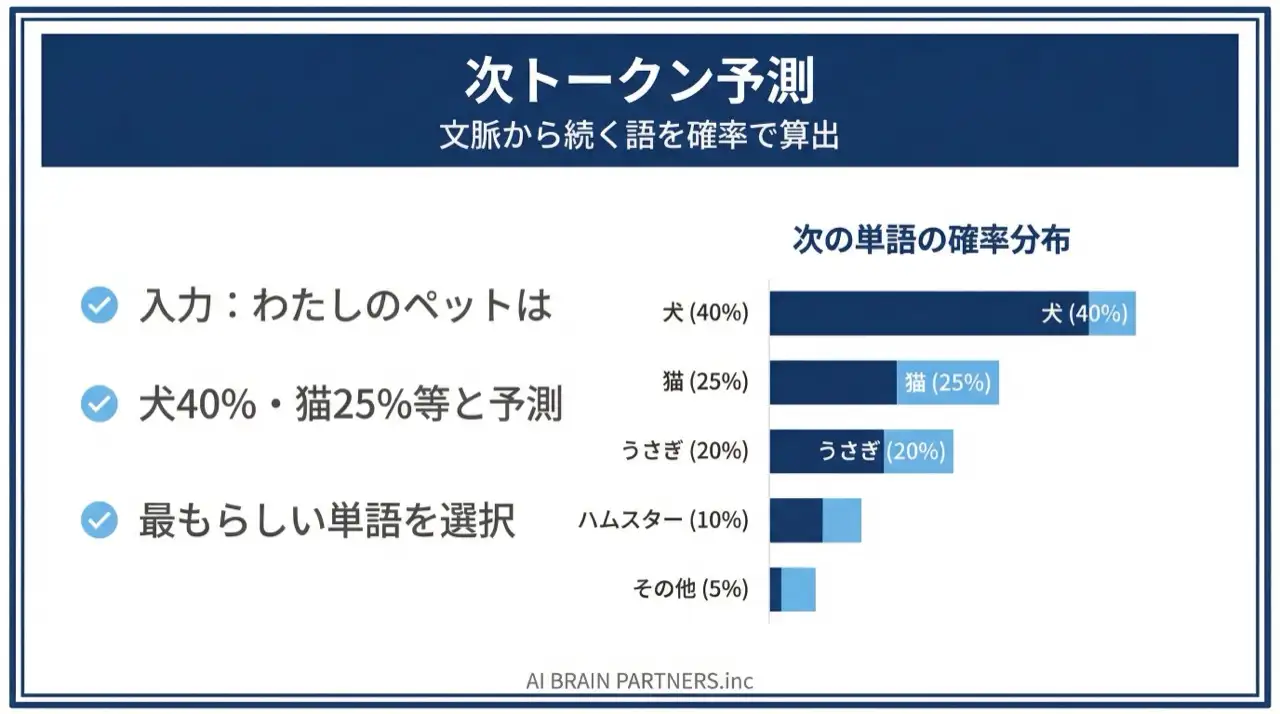
For an input like "Today's weather is," the model internally computes something like:
- "sunny" 40%
- "cloudy" 25%
- "rainy" 20%
- "nice" 10%
- everything else 5%
Repeating this prediction one token at a time (autoregressive generation) produces natural-sounding text.
Two business-critical implications follow:
- LLMs generate by "naturalness," not "correctness" — which is why hallucinations (plausible errors) are structural, as discussed below
- Output has randomness — controlled by a parameter called Temperature. Lower it for reproducibility-focused tasks (summarization, extraction); raise it for idea-focused tasks (brainstorming, copywriting)
Tokens and cost — the unit you need to know
If you're going to use generative AI seriously at work, developing a feel for tokens will save you from cost-management and tool-selection mistakes.
- A token is the smallest unit an LLM processes. As a rule of thumb, roughly 1,000 Japanese characters ≈ 500–700 tokens; English is more token-efficient than Japanese for the same meaning
- Pricing is based on input tokens plus output tokens, and output is typically priced 2–8x higher than input
LLMs also have a context window — an upper limit on how many tokens they can process at once. Long conversations or large documents hit the ceiling, and older information behaves as if "forgotten." Most cases of "the AI forgot my instructions" trace back to this mechanism.
Three basics for keeping costs down:
- Keep prompts concise — cut redundant preamble
- Pass only the information needed — the relevant section, not the whole document
- Specify the output format — "five bullet points max" suppresses output tokens
How it differs from traditional chatbots
| Aspect | Traditional chatbot | Generative AI |
|---|---|---|
| Response | Returns predetermined answers | Generates based on context |
| Coverage | Only anticipated questions | Handles novel requests |
| Output | Fixed text | Text, summaries, code, images |
| Mechanism | If-then rules | Next token prediction (LLM) |
| Business value | FAQ auto-response | Document drafting, analysis, deliverables |
What generative AI can do as actual work
- Summaries and drafts of meeting minutes, daily reports, and other documents
- Writing emails, proposals, and social media posts
- Assisting with organizing, classifying, and aggregating spreadsheet data
- Q&A over internal documents (knowledge search)
- Code generation and data-processing automation
Note, though, that most of these are "runs once per human instruction." True business automation comes with the AI agents discussed below.
Hallucinations — the biggest caveat
Before any business use, you must understand hallucination: the phenomenon of AI generating plausible-sounding information not grounded in fact. It isn't a bug — it's a structural property of LLMs, which predict "the most natural next token."
There are four typical patterns:
| Type | What happens | Example |
|---|---|---|
| Fabricated facts | Invents facts that don't exist | Presents nonexistent statistics or dates |
| Conflated facts | Mixes up distinct facts | Attributes person A's achievements to person B |
| Fabricated citations | Cites papers or articles that don't exist | Generates plausible author names and even URLs |
| Self-contradiction | Contradicts itself within one answer | Says "there are three" then lists four |
Fabricated citations are especially dangerous — without verification they're indistinguishable from real ones. Countermeasures for business:
- Make it an operational rule to verify critical numbers, dates, and proper nouns against primary sources
- Explicitly instruct: "If you are uncertain, answer 'I don't know'"
- Use RAG (below) to ground answers in internal documents, with sources cited
- Separate strengths (ideation, drafting, summarization) from weaknesses (fact-checking, current events, specialized legal/medical judgment)
"The more confident the answer, the more you should doubt it" — that's the baseline posture for business users of generative AI.
From generative AI to AI agents (autonomous execution)
An AI agent is software that, given a "goal," repeats plan → execute tools → check results → replan on its own, carrying multi-step work through to completion.
- Chatbot = one question, one answer
- AI agent = "handle it" → completes multiple stages of work
The key enabler is tool use. An LLM alone can only generate text — it doesn't even know today's date. Connected to tools — reading and writing files, running commands, web search, external services (Slack, calendar, databases) — it can finally "get its hands on" real work. The spread of MCP (Model Context Protocol), a standard for connecting external services, has made this integration far easier than before.
An agent operates in a loop: plan → execute → observe → replan. For "prepare the morning report and share it with stakeholders," it checks email, summarizes, drafts, and sends — verifying intermediate results itself, and attempting self-correction when errors occur.
| Comparison | Traditional AI assistant | AI agent |
|---|---|---|
| Operation | One response per question | Multi-step autonomous execution toward a goal |
| Tool use | Essentially none | Files, commands, web, external APIs as needed |
| Planning | Passive (waits for instructions) | Active (makes its own plan) |
| Error handling | User issues corrections | Attempts self-correction and retries |
| Examples | ChatGPT (basic mode) | Claude Code, Cursor Agent, Devin |
For concrete workplace applications, see Slack + AI automation, scheduled agents with GitHub Actions, and AI marketing automation.
The six levels of AI autonomy — locating your organization
As a yardstick for "how much should we delegate to AI," classifying autonomy into levels 0–5 makes internal discussions far more productive.
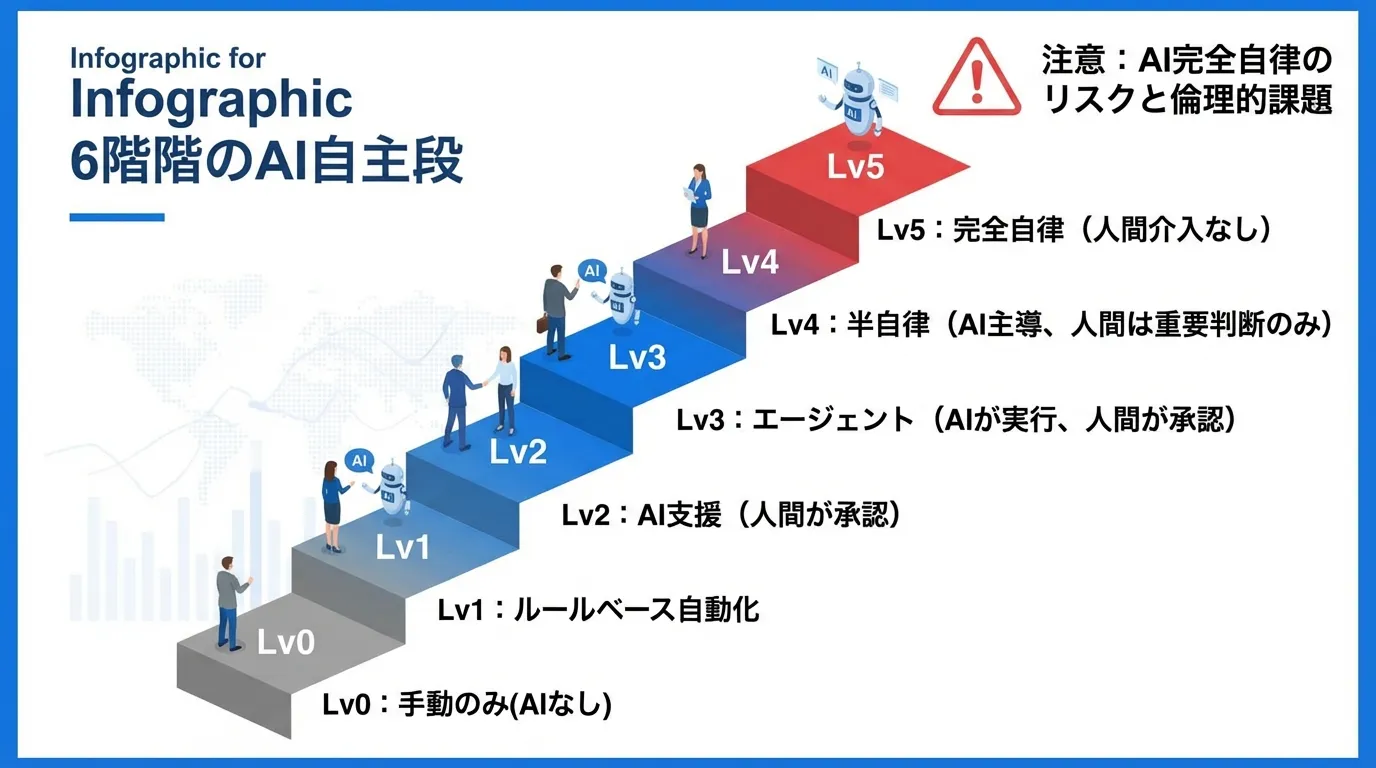
| Level | Name | Description | Example |
|---|---|---|---|
| 0 | Manual, human-only | Humans execute everything by hand | Manual data entry, email handling |
| 1 | Rule-based automation | Simple if-then automation | Excel macros, mail filters, fixed RPA |
| 2 | AI-assisted | AI supports judgment; humans verify and execute | ChatGPT drafting, code completion |
| 3 | Agentic workflows | AI plans and executes multi-step work; humans approve | Claude Code / Cursor Agent (standard mode) |
| 4 | Semi-autonomous agents | AI handles most work; humans only for key decisions | Agents in auto-approve mode |
| 5 | Fully autonomous | Completes work with no human intervention | Research stage |
Most companies today sit at level 2 (AI-assisted). Moving from ChatGPT drafting to levels 3–4 requires designing the guardrails discussed below (permissions, rules, verification procedures). The crucial principle: higher autonomy = higher risk, so adjust the autonomy level to the importance of each task.
RAG — connecting internal knowledge to generative AI
The corporate need for "answers that reflect our policies and past cases" is met by RAG (Retrieval-Augmented Generation).
RAG is like an "open-book exam." Where a plain LLM answers only from memorized knowledge, RAG retrieves relevant internal documents from a database and answers while consulting them.
The corporate benefits are clear:
- Stays current — update the document database instead of retraining the model
- Cites sources — "this answer is based on article X of policy Y," which counters hallucination
- Leverages internal documents — answers about company-specific information the LLM never learned
- Cost-efficient — cheaper than fine-tuning (additional training) of the model
The standard split: internal FAQs, document search, and current information → RAG; changing the AI's speaking style itself → fine-tuning.
Steps for bringing generative AI into your business
- Pick one routine task — something repeated daily or weekly with low-stakes judgment
- Write out the procedure in words — natural language, not code
- Delegate to generative AI / an agent and verify — start small, inspect results, adjust instructions
- Set guardrails and operate — mask real data, start with minimal permissions; per the autonomy levels above, begin at level 3 (human approves)
- Hand over a verification method too — instead of "handle it," say "run it, check the result, and report what you checked" for stable quality
To get your team's instruction-writing skills up to speed, see Prompt Engineering: A Practical Guide for the AI Agent Era. For organization-wide adoption with hands-on training, our corporate AI agent training is available, and for the people-development angle see AI Agents for Employee Training.
Frequently asked questions
Q. What's the difference between generative AI and an AI agent? A. Generative AI is a tool that generates text or deliverables once per instruction; an AI agent is a mechanism that uses generative AI to autonomously execute multiple steps toward a goal. Agents use tools (file operations, command execution, external integrations) and run a plan → execute → observe → replan loop. Multi-stage work like daily report preparation suits agents.
Q. Why does generative AI get things wrong (hallucinate)? A. Because LLMs generate text based on "which token is most likely next," not "what is correct." It's a structural property, not a bug. Build countermeasures into operations: verify key numbers and citations against primary sources, instruct the AI to say "I don't know" when uncertain, and use RAG for source-grounded answers.
Q. Can non-engineers use this for real work? A. Yes. Anyone who uses ChatGPT or Gemini day to day can start without programming experience. Adoption is spreading across finance, HR, communications, sales, and other non-engineering roles. What agent work requires isn't code — it's the ability to articulate business procedures in words.
Q. Where should we start? A. Pick one low-stakes routine task repeated daily or weekly, write the procedure in natural language, and hand it to generative AI. Test small, refine the instructions, then set guardrails (masking, least privilege, human approval) before expanding. In autonomy-level terms, level 3 (human approves) is the safe starting point.
Q. Isn't it risky to let AI answer using internal data? A. RAG reduces hallucination risk by retrieving internal documents and answering with sources cited. Combine it with three guardrails — masking real data, minimizing access permissions, and human approval for critical operations — and you have the standard foundation for corporate adoption.
Related articles
- Prompt Engineering: A Practical Guide for the AI Agent Era
- The Complete Guide to AI Agents for Business
- AI Agent Governance: The New Competitive Edge
- AI Agents for Employee Training & Talent Development
- Running AI Agents on a Schedule with GitHub Actions
- Corporate AI Agent Training (Hands-on)
Related services
Ready to put AI agents to work?
Turn what you just read into real workflows. AI Agent Camp helps non-technical professionals go from using to building — hands-on.
Last reviewed: 2026-06-10