
"Everyone says prompt engineering matters — but what's the actual trick?" It's the wall everyone hits when they start using generative AI for real work.
This article covers the fundamentals of prompt engineering as reusable "patterns," then goes on to Context Engineering — designing the instructions and information environment — which is what really matters in the AI agent era, all explained practically for non-engineers. The content is based on the foundation lectures we actually use in our corporate training and online course.
For how AI agents themselves work, see also The Complete Guide to AI Agents for Business.
What you will learn
- What prompt engineering is and why it works
- The five basics of good prompts, and the 4-element template (role, context, task, format)
- What comes after prompts: Context Engineering (rules files and the information environment)
- The context window — why AI "forgets" instructions and what to do about it
- Plan Mode and meta-prompting — having AI write the plan and the prompt
- Designing instructions for AI agents, and seven best practices
- Practical workplace examples and how non-engineers should learn
What is prompt engineering?
Prompt engineering is the craft of designing and refining instructions (prompts) to get the results you want from generative AI (ChatGPT, Claude, Gemini, etc.).
The same AI produces dramatically different output depending on how you ask. No certifications or code required — the core is clearly conveying "what, in what format, under what assumptions."
Why does instruction quality matter so much? An LLM generates text by predicting "the most probable next word" from the input text (the context), so vague input produces vague output — that's the logic behind why prompt engineering works.
The five basics of good prompts
| Technique | Bad example | Good example |
|---|---|---|
| Assign a role | "Summarize this" | "Summarize in 3 points for an executive meeting" |
| Specify output format | "Tell me about X" | "5 bullet points, 15 words each" |
| Provide assumptions | (asks abruptly) | "Audience is non-engineers; explain jargon" |
| Show examples | — | "Match this tone: …" |
| Ask in stages | Everything at once | "First the outline → then the body" |
Of these, specifying the output format also pays off in cost. Generative AI pricing scales with output length (token count), and output is typically priced higher than input — so simply constraining the format ("bullet points," "a table," "conclusion first") improves both quality and cost.
The 4-element prompt template
To apply the five basics consistently in real work, use the pattern of Role, Context, Task, Format.
- Role — what position should the AI answer from? "You are an accounting manager with 10+ years of experience"
- Context — background and assumptions. "We are a 50-person B2B SaaS company"
- Task — what exactly to do. "Create a monthly closing checklist"
- Format — how to present it. "A table with owner and deadline columns"
A complete example combining all four:
You are an accounting manager with 10+ years of experience.

## Context
- Company: 50-person B2B SaaS company
- Accounting software: freee
- Reader: a new hire with no accounting experience

## Task
Create a monthly closing checklist.

## Requirements
- Assume completion within 5 business days of the cutoff
- Add cautionary notes where people commonly stumble

## Output format
A table with three columns: task, deadline, notes.
You don't need to write from scratch every time. Turn prompts that worked into templates in this pattern and reuse them across the team — that's where organizational productivity differences come from.
Why clever phrasing isn't enough — Context Engineering
Early LLMs had small context windows (the amount of information you can pass at once), so polishing the wording of short prompts was sufficient. Today's models handle orders of magnitude more information, and the battleground has shifted from "how do I phrase one question" to "what information environment do I give the AI." That is Context Engineering.
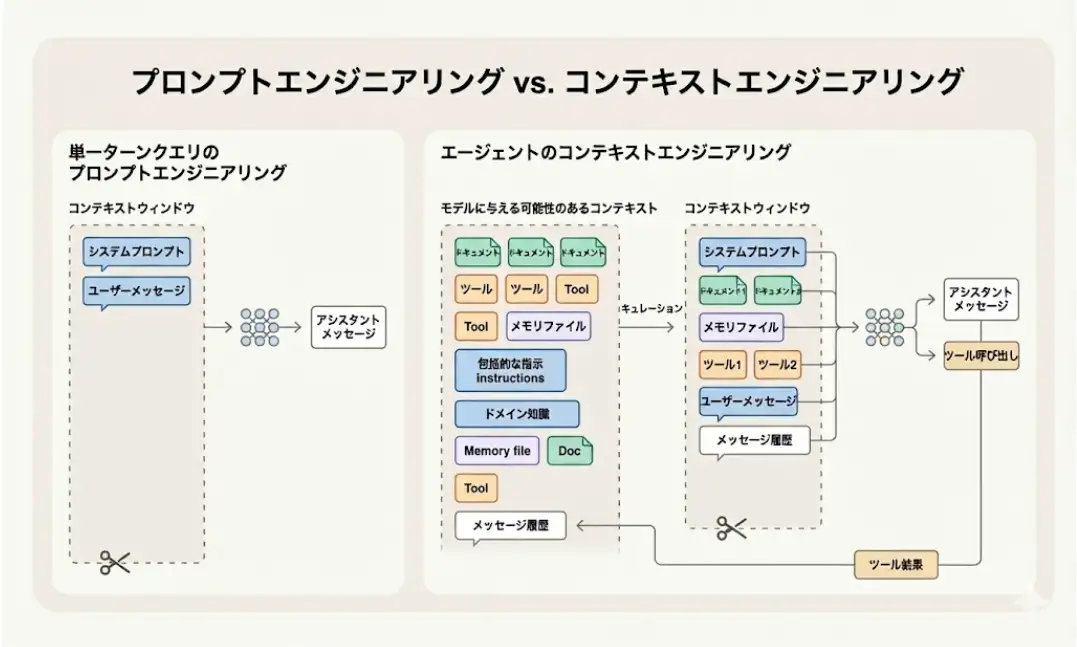
| Aspect | Prompt engineering | Context Engineering |
|---|---|---|
| Focus | Phrasing of one question | Design of the whole information environment |
| Components | The instruction | Instruction + reference docs + tools + rules files + conversation history |
| Scope of effect | That single output | Consistent output quality across the team |
The flagship example of Context Engineering in practice is the rules file. Write your company's glossary, style, prohibitions, and procedures into Cursor's .cursor/rules or the open standard AGENTS.md (supported by many AI agent tools), and everyone on the team gets the same output quality without repeating it in every prompt.
What belongs in a rules file: company-specific rules, procedures, naming conventions. What doesn't: things obvious from reading, common sense, and no-op instructions like "write carefully." Bloated rules crowd the context on every call and actually degrade accuracy.
The context window — why AI "forgets"
Alongside prompt quality, the other big driver of output quality is context window management.
The key fact: AI does not "remember" your conversation. In a chat, the system settings, rules, reference documents, and the entire conversation history are bundled and passed in as context on every turn. As the conversation grows, this window fills up, old information gets summarized or dropped, and you experience "the AI forgot my first instruction."
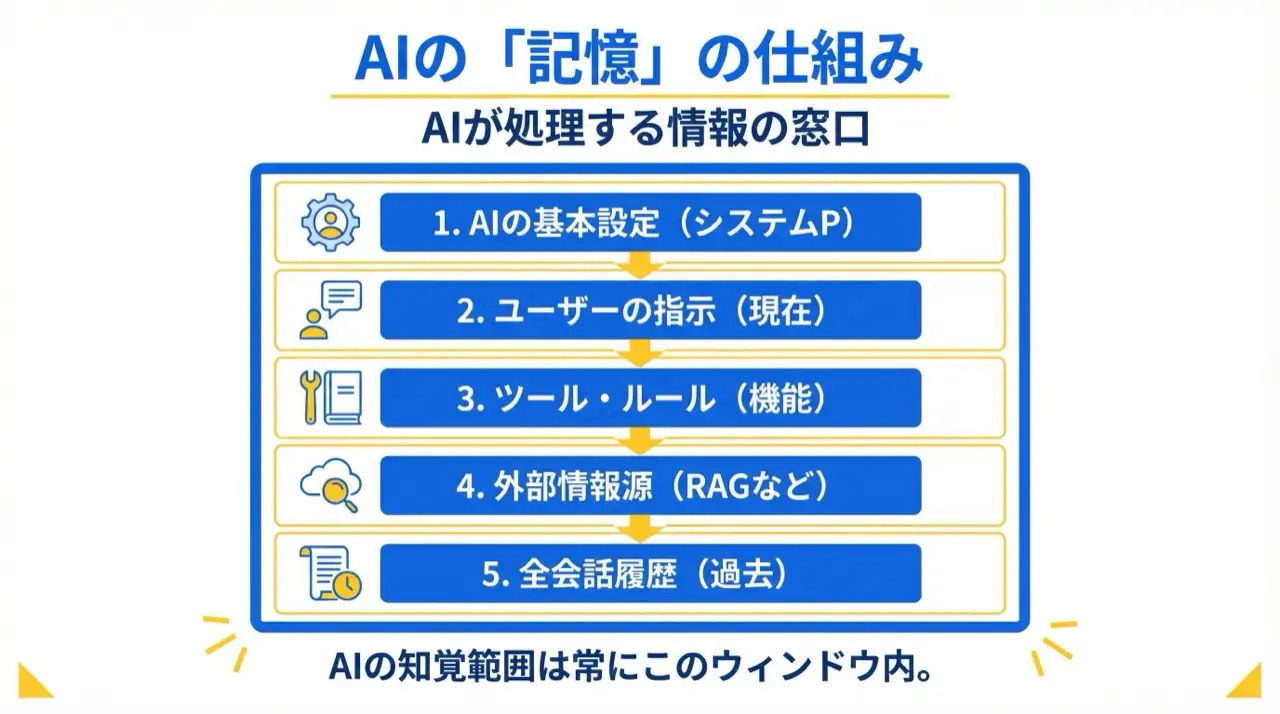
The practical countermeasures are simple:
- One task = one chat — start a new conversation when the task changes
- Reset long conversations — when accuracy degrades, summarize key points and start a fresh session
- Don't paste huge documents wholesale — pass only the relevant sections
- Write important decisions to files or notes — don't rely on the AI's "memory"
When "the prompt is perfect but output is unstable," the culprit is usually a polluted context, not the prompt.
Plan Mode and meta-prompting — let AI write the plan and the prompt
The next move beyond prompt design is having AI write the prompt itself. Two key techniques:
Plan Mode (start from a plan) — instead of letting an AI agent start working immediately, have it first lay out "what it will do and how," review and agree as a human, then let it execute. Five minutes reviewing a plan prevents hours of rework in the wrong direction.
Meta-prompting (have AI write the prompt) — rather than tossing a vague "build me X" at the AI, ask it to "write the optimal prompt for executing this request; ask me about anything unclear." The AI elicits the requirements — purpose? target users? output format? success criteria? — and produces a structured, high-quality prompt.
Combining the two — meta-prompting to craft a high-quality instruction, then Plan Mode to turn it into a reviewed plan before execution — is the current standard play for agent work. Add "don't guess on ambiguities; ask me with options before proceeding," and rework from vagueness nearly disappears.
From one-shot prompts to "instruction design" for AI agents
This is the heart of the agent era.
- One-shot prompt = one request, one output
- Instruction for an AI agent = a "goal" plus the tools allowed, the procedure, and the guardrails — for autonomous multi-step execution
In other words, an agent-era prompt is no longer one piece of text but a blueprint of the business procedure itself: "read this data → classify by these criteria → handle exceptions this way → output results in this format." Articulating procedure and judgment criteria is where the skill shows.
Seven best practices for instructing agents
These principles emerged from coding-agent practice (Claude Code, Cursor, etc.) but apply directly to non-engineering work like meeting minutes and data cleanup.
- Provide a verification method — not "handle it" but "run it, check the result, and report what you checked." Give the AI a way to quality-check itself
- Explore → plan → implement, in that order — don't let it start working immediately; begin with understanding the current state and a plan (Plan Mode)
- Pass concrete context — point it at the actual files and materials; attach rich information like screenshots and URLs
- Set up the environment — define standing rules in rules files (
.cursor/rules/AGENTS.md) so each instruction stays short - Converse well with the AI — ask "why this approach?" as you would a colleague; when direction is unclear, have the AI interview you for requirements
- Manage sessions — reset the conversation when switching to unrelated tasks or after two failed attempts; keep the context clean
- Automate for productivity — turn stable instructions into templates and commands; separate creator and reviewer sessions
Practical workplace examples
- Meeting minutes: "summarize remarks → separate decisions from TODOs → organize by owner"
- Inquiry handling: "consult past cases → draft a reply → escalate uncertain points to a human"
- Reports: "load the data → compute week-over-week → write three observations"
In every case, moving from "a human instructs each time" to "design the procedure once and delegate" slashes the workload. For concrete domains, see Slack + AI automation and AI marketing automation.
One more thing: when handing a procedure to an agent, spell out how to handle uncertainty. "If you're not confident, preface with 'I'm not certain'" and "if there's no source, state 'verification needed'" — those two lines alone dramatically improve resistance to plausible errors (hallucinations).
How to learn (for non-engineers)
- First, exhaust the good-prompt patterns (five basics + 4-element template) on one real task
- Save instructions that worked as templates and reuse them
- Move recurring assumptions and rules into a rules file (
.cursor/rules/AGENTS.md) - Once one-shot results are stable, articulate the procedure and delegate it to an agent (Plan Mode + verification instructions)
- Set guardrails (mask real data, least privilege) and put it into operation
For organization-wide adoption, see What Is Generative AI? A Business Guide for the foundations, and our corporate AI agent training for hands-on team learning.
Frequently asked questions
Q. Does prompt engineering require certifications or programming? A. No. Master the patterns — role, output format, assumptions, examples, staged requests — and non-engineers can get strong results. What matters is not code but the clarity of the request.
Q. What's the difference between prompt engineering and Context Engineering? A. Prompt engineering is the craft of phrasing one question well; Context Engineering is the craft of designing the entire information environment — reference documents, rules files, tools, and conversation history. Now that models can ingest vastly more information, the latter determines team-level output quality.
Q. I give careful instructions, but the AI forgets them mid-conversation. Why? A. The AI doesn't remember the conversation — every turn, the full history is packed into the context window (the limit on information passed at once). As the conversation grows, older content gets summarized or dropped, which looks like "forgetting." Operate one task per chat and write important assumptions into notes or rules files.
Q. Do prompt skills still matter in the AI agent era? A. They matter more. Agents receive not a single question but an instruction design including procedure, judgment criteria, and guardrails — so how well you decompose and articulate the work determines the outcome. The key technique is always passing a verification method (what does success look like) along with the task.
Q. What should I practice on first? A. Pick one task you repeat daily — minutes, summaries, email drafts — and apply the good-prompt patterns to it until stable. Then template it and evolve it into agent procedure design. If you're stuck writing the prompt itself, use meta-prompting: ask the AI to "write the optimal prompt for this; ask me about anything unclear."
Related articles
- What Is Generative AI? A Business Guide to LLMs and AI Agents
- The Complete Guide to AI Agents for Business
- Slack + AI: Semantic Search, Task Extraction & Unanswered Checks
- Building Landing Pages with AI: From Messaging to Vercel Deploy
- Corporate AI Agent Training (Hands-on)
Related services
Ready to put AI agents to work?
Turn what you just read into real workflows. AI Agent Camp helps non-technical professionals go from using to building — hands-on.
Last reviewed: 2026-06-10